GitHub Copilot でナレッジを蓄えて自己進化するアドバイザーシステムを作ってみた
GitHub Copilotのエージェント機能を使って、ナレッジベースを評価・改善する自己進化型のアドバイザーシステムを構築。複数エージェントが協調して動作し、自動的に回答品質を向上させる仕組みを検証しました。
きっかけ
最近、GitHub Copilot のエージェント機能を触っていて、ふと思った。「エージェントに質問したときの回答って、毎回同じようなクオリティになるのかな?」って。
で、ちょっと考えてみたんだけど、人間のアドバイザーって経験を積むごとに良い回答ができるようになるじゃないですか。それをAIでも再現できないかなと。
要するに、ナレッジベースを持たせて、それを評価して改善していくループを回せば、回答の質が上がっていくんじゃないかという仮説。
というわけで、実際に仕組みを作って検証してみました。
全体の仕組み
作ったのは、複数のエージェントが協調して動くシステムです。大きく分けて4つのエージェント(Main、Sub-A、Sub-B、Sub-C)を用意して、それぞれが役割を持って動く。
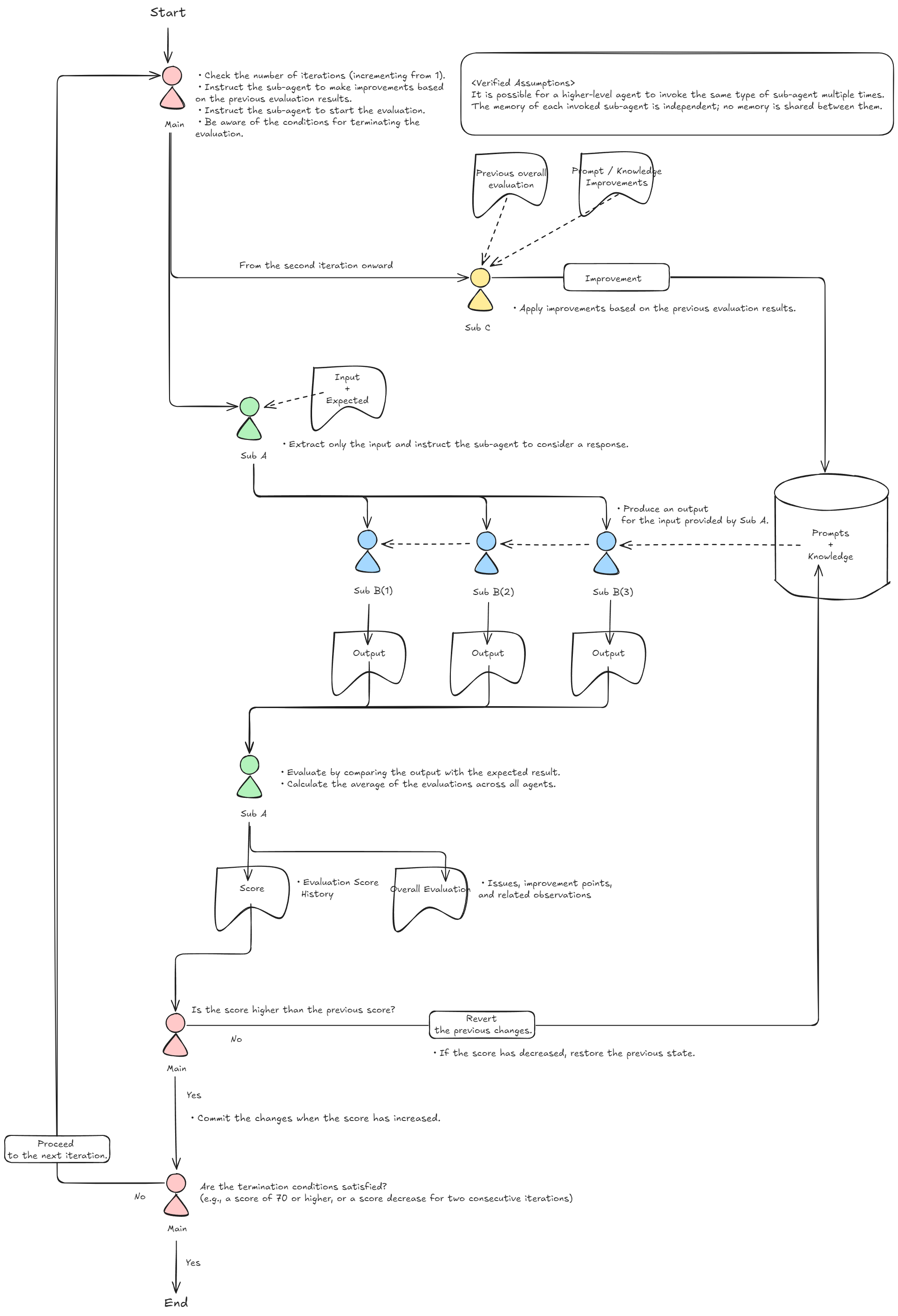
上の図が全体像なんですけど、ざっくり説明すると:
- Main Agent:全体を統括する司令塔。試行回数を管理して、改善と評価のサイクルを回す
- Sub-A Agent:テスターの役割。ベンチマークケースを使って回答を評価する
- Sub-B Agent:実際にアドバイスを生成するアドバイザー。ナレッジベースを参照して回答を作る
- Sub-C Agent:改善役。評価結果を見てナレッジベースを更新する
この4つが連携して、5回のトライアルを自動で回していく感じ。
実装:エージェントファイルの準備
GitHub Copilot のエージェント機能は、.github/agents/ 配下に Markdown ファイルを置くことで使えます。フロントマターで名前や使えるツールを定義して、本文に具体的な動作を書く。
Main Agent の定義
メインエージェントは、全体のオーケストレーションを担当する。
10-main.agent.md(クリックで展開)
---
name: Main Agent
description: This custom agent manages the overall improvement loop by coordinating Sub-A and Sub-C agents.
tools: ['vscode', 'execute', 'read', 'agent', 'edit', 'search', 'web', 'todo']
---

# Main Agent

**Role**: Overall management of the improvement loop (orchestrator)

**Behaviors**:
- **Trial loop management**:
  - Check `docs/scores.yml` at startup.
  - If records exist, set the current trial number to the last trial number + 1.
  - If no records exist, set the current trial number to 1.
- **Improvement execution instructions**:
  - If the current trial number is **2 or later**, instruct the Sub-C agent to make improvements based on the previous review.
  - After receiving the improvement completion report from Sub-C, proceed to the next step.
- **Evaluation execution instructions**:
  - Instruct the Sub-A agent to start the evaluation process, communicating the current "trial number".
- **Termination condition judgment**:
  - Terminate processing if any of the following conditions (OR) are met:
    1. The trial number has reached 5.
    2. The evaluation score (average points) has declined for two consecutive trials.
- **Actions after evaluation completion**:
  - After receiving the completion report from Sub-A, check `docs/scores.yml`.
  - **Rollback on score decline**:
    - If the current score is lower than the previous score, determine that changes by Sub-C had a negative impact and **discard only changes to the `knowledge/` directory and `config.yml`** (retain records in the `docs/` directory).
  - **Commit on score improvement or maintenance**:
    - If the current score is higher than or equal to the previous score, determine that changes by Sub-C were effective and commit the changes.
    - Example commit message: `Trial <trial number>: Improved knowledge base (Score: <current score>)`
  - **Transition to next cycle**:
    - If termination conditions are not met, increment the trial number and start the next loop.
ポイントは、スコアが下がったときのロールバック機能を入れたこと。knowledge/ ディレクトリと config.yml だけ元に戻して、評価記録は残す。これで、改悪を防ぎつつ、どういう変更がダメだったか記録できる。
Sub-A Agent:評価担当
20-sub-a.agent.md(クリックで展開)
---
name: Sub-A Agent
description: This custom agent conducts benchmark tests and evaluations using multiple Sub-B agents.
tools: ['vscode', 'execute', 'read', 'agent', 'edit', 'search', 'web', 'todo']
---

# Sub-A Agent

**Role**: Benchmark testing and evaluation implementation (tester)

**Behaviors**:
- **Test preparation**:
  - Create a directory `docs/trials/<trial number>/` for the current trial.
  - Read `docs/advice-benchmark-cases.md`.
  - Extract only the `Input` (consultation content) from each test case.
- **Answer generation instructions**:
  - Launch 3 Sub-B agents (instances) to prevent bias in responses.
  - Instruct each Sub-B agent to create answers by passing "Input", "current trial number", and "instance number (1-3)".
- **Evaluation and scoring**:
  - Compare and evaluate the `Output` (answers) obtained from the 3 Sub-B agents against the benchmark's `Expected` (expected response approach).
  - Score on a scale of 0-10 points (to one decimal place).
- **Result recording**:
  - **Score**: Append to `docs/scores.yml`.
    - Use the following YAML array format:
      ```yaml
      - trial: <trial number>
        details:
          sub_b_1: <score>
          sub_b_2: <score>
          sub_b_3: <score>
        average: <average score>
      ```
  - **Review**: Record in `docs/trials/<trial number>/review.md`.
    - Describe specific issues and missing perspectives in responses to serve as hints for knowledge improvement.
- **Completion report**:
  - Report to the Main agent upon completion of evaluation and recording.
Sub-B を3回起動して、回答のブレを見るようにした。同じナレッジベースでも、生成ごとに微妙に違う回答が出るので、その平均を取ることで評価の安定性を上げている。
Sub-B Agent:アドバイザー本体
30-sub-b.agent.md(クリックで展開)
---
name: Sub-B Agent
description: This custom agent generates answers based on the knowledge base using a RAG-like approach.
tools: ['vscode', 'execute', 'read', 'agent', 'edit', 'search', 'web', 'todo']
---

# Sub-B Agent

**Role**: Knowledge-based answer generation (advisor)

**Behaviors**:
- **Knowledge selection (RAG-like approach)**:
  - Analyze the `Input` (consultation content) and extract important keywords.
  - Read `config.yml` and narrow down the knowledge files (`path`) to be referenced based on extracted keywords and categories.
  - Read only the selected knowledge files to serve as the basis for the answer (to prevent context overflow).
- **Answer consideration**:
  - Create answers to the `Input` received from Sub-A.
  - Strictly reference the content of selected knowledge and derive answers aligned with its perspectives and approach.
- **Answer output**:
  - Save the created answer to `docs/trials/<trial number>/sub-b-<instance number>-output.md`.
- **Completion report**:
  - Report to the Sub-A agent upon completion of output.
ここがRAGっぽい部分で、入力からキーワードを抽出して、config.yml を見て必要なナレッジファイルだけ読み込む。コンテキストの肥大化を防ぐための工夫です。
実際、最初は全部のナレッジを読み込ませていたんだけど、トークン数がすぐにパンクした。だから、必要最小限に絞る仕組みが必須だった。
Sub-C Agent:改善担当
40-sub-c.agent.md(クリックで展開)
---
name: Sub-C Agent
description: This custom agent improves the knowledge base based on evaluation feedback.
tools: ['vscode', 'execute', 'read', 'agent', 'edit', 'search', 'web', 'todo']
---

# Sub-C Agent

**Role**: Knowledge base improvement (trainer/engineer)

**Behaviors**:
- **Improvement implementation**:
  - Based on instructions from the Main agent, modify and improve the structure and file contents in `config.yml` and the `knowledge/` directory.
- **Improvement recording**:
  - When improvements are made, describe them in `docs/trials/<trial number>/improvements.md`.
  - Create the directory `docs/trials/<trial number>/` if it does not exist.
- **Improvement basis**:
  - Read `docs/trials/<trial number>/review.md` of the latest trial (the one with the highest trial number).
  - Update knowledge to resolve the identified issues (add perspectives, make concrete, organize structure, etc.).
- **Maintainability of searchability**:
  - When adding or modifying knowledge files, also update `keywords` and `description` in `config.yml` appropriately so that the Sub-B agent can correctly reference them.
- **Completion report**:
  - Report to the Main agent upon completion of improvement work.
Sub-C は、前回の review.md を読んで、指摘された問題を解決するようにナレッジを書き換える。このとき、config.yml のキーワードとか説明も一緒に更新するのがポイント。Sub-B がちゃんと必要なナレッジを見つけられるように。
ベンチマークケースの設計
評価のために、10個のテストケースを用意しました。内容は「仕事での自信喪失」「上司との関係」「転職の迷い」みたいな、よくある人生相談。
各ケースには:
- Input:相談内容
- Expected:期待される回答のアプローチ(「感情の受容」「主観と事実の区別」など)
を定義してある。
評価は、Sub-A が各回答と Expected を見比べて、0〜10点でスコアリングする。具体的には、「共感が足りない」「論理的な提案が弱い」といった観点でレビューを書き、次の改善につなげる。
初期プロンプトとセットアップ
実際に動かす前に、初期セットアップ用のプロンプトも作りました。
init.prompt.md(クリックで展開)
---
name: init-advisor-system
description: Performs initial setup of the Advisor Evaluation System (generates agent definition files).
tools: ['vscode', 'execute', 'read', 'edit', 'search', 'web', 'skillport/*', 'terminal-runner/*', 'agent', 'todo']
---

This repository is an environment for cultivating and verifying an AI that acts as an "advisor for people's concerns". Rather than a simple consultation AI, the goal is to improve the quality and consistency of responses by running the following cycle:

1. **Knowledge creation from perspectives**: Accumulate and structure knowledge that serves as the basis for responses
2. **Verification**: Evaluate response consistency and approach using benchmark tests
3. **Improvement**: Like supervised learning loops, improve knowledge based on evaluation results

To achieve this goal, please create the following 4 AI agent definition files and necessary directory structure.

## Agent List to Create

1. **Main Agent** (`.github/agents/10-main.agent.md`)
2. **Sub-A Agent** (`.github/agents/20-sub-a.agent.md`)
3. **Sub-B Agent** (`.github/agents/30-sub-b.agent.md`)
4. **Sub-C Agent** (`.github/agents/40-sub-c.agent.md`)

(以下、エージェントの詳細仕様が続く...)
このプロンプトを使うと、必要なエージェントファイルとディレクトリ構造を一発で作ってくれる。手動で全部書くのは面倒だったので、この自動生成は便利でした。
実際に動かしてみた結果
5回のトライアルを実行して、スコアの推移を記録しました。
- trial: 1
  details:
    sub_b_1: 9.9
    sub_b_2: 9.8
    sub_b_3: 8.6
  average: 9.4

- trial: 2
  details:
    sub_b_1: 9.7
    sub_b_2: 9.4
    sub_b_3: 9.6
  average: 9.6

- trial: 3
  details:
    sub_b_1: 9.8
    sub_b_2: 9.7
    sub_b_3: 9.9
  average: 9.8

- trial: 4
  details:
    sub_b_1: 9.8
    sub_b_2: 9.6
    sub_b_3: 9.9
  average: 9.8

- trial: 5
  details:
    sub_b_1: 8.5
    sub_b_2: 9.2
    sub_b_3: 9.5
  average: 9.1
最初は 9.4 点だったのが、Trial 3 と 4 で 9.8 点まで上がった。その後 Trial 5 で 9.1 点に落ちている。
何が起きたか
Trial 3〜4 までは順調にスコアが改善されていた。Sub-C が review.md を読んで、「もっと具体例を入れよう」とか「フレームワークを明確化しよう」みたいな改善をしていった結果、評価が上がった。
ただ、Trial 5 では Sub-C が欲張って大幅な構造変更をした(たぶん)。それが逆効果で、スコアが下がった。
もしロールバック機能がなければ、このまま改悪されたナレッジが残ってしまうところだった。Main Agent が自動で変更を破棄してくれたので、Trial 4 の状態に戻せた。
分かったこと・感じたこと
良かった点
- スコアは実際に改善される:初回 9.4 → 最高 9.8 という上昇は、改善ループが機能している証拠
- ロールバック機能が重要:改悪を防ぐセーフティネットがないと、どんどん悪化する可能性がある
- 複数インスタンスでのテストが有効:Sub-B を3回起動することで、生成のブレを平均化できた
課題
- 改善幅が限定的:9.4 → 9.8 という改善はあったけど、劇的な変化ではない。もともとのナレッジがそこそこ良かったので、伸びしろが少なかった可能性がある
- 大幅変更のリスク:Trial 5 みたいに、エージェントが頑張りすぎて改悪するケースがある。「小さな改善を積み重ねる」というガイドラインが必要かも
- 評価の妥当性:Sub-A の評価基準が明確でないと、スコアの信頼性が下がる。今回は Expected との比較だけだったので、もっと詳細な評価軸を用意すべきだった
まだ試していないこと
- ベンチマークケースを増やす(10個だと少ない気がする)
- ナレッジファイルを複数に分割して、カテゴリごとに管理
- Sub-C の改善戦略を明示的に制約する(「1回のトライアルで変更は3箇所まで」みたいな)
この辺は、また時間があるときに試してみたい。
まとめ
GitHub Copilot のエージェント機能を使って、ナレッジベースを持ち、それを評価・改善していくシステムを作ってみました。
結果としては:
- 改善ループは動作する(9.4 → 9.8 の改善を確認)
- ロールバック機能が重要(Trial 5 で実証)
- エージェント間の連携で複雑な処理を自動化できる
という感じ。
まだ粗削りな部分も多いけど、「エージェントが自分で学習していく」という方向性は面白いと思った。特に、チーム開発とかドキュメント管理とかで、知見を蓄積しながら自動で更新していくシステムに応用できそう。
興味ある人は、この記事のエージェントファイルをそのまま使ってもらえれば動くと思います。ぜひ試してみてください。
参考リポジトリ
今回作ったコードは以下の構成です:
.github/agents/
  ├── 10-main.agent.md
  ├── 20-sub-a.agent.md
  ├── 30-sub-b.agent.md
  └── 40-sub-c.agent.md
.github/prompts/
  └── init.prompt.md
knowledge/
  └── general.md
docs/
  ├── advice-benchmark-cases.md
  ├── scores.yml
  └── trials/
各ファイルの詳細は上記の折りたたみセクションを参考にしてください。
関連する植物
multi-agent-ff15: AIエージェントを「道具」から「仲間」へ変える革命
6人のAIエージェントが並行動作するマルチエージェントシステム。APIコストゼロの協調作業で、開発を加速させる新しいアプローチ
#ai#multi-agent#opencodeWSL環境におけるopencodeとoh-my-opencodeの導入ガイド
WSL環境にopencodeとoh-my-opencodeを導入し、Claude、GPT-5、Geminiなど複数のAIモデルをエージェントとして活用する方法を解説。マルチエージェント管理で開発効率を最大化します。
#opencode#ai#wslGitHub RulesetでCopilotの自動コードレビューを設定する方法
GitHub Rulesetを使用して、特定のブランチに対するプルリクエストでGitHub Copilotによる自動コードレビューを有効にする手順を解説します。
#github#github-copilot#automation