Power Query | Creating a Calendar for a Specified Period Using Parameter Configuration (Power BI)
When using Power BI, there are instances where you might want to create a calendar based on dates. In this scenario, I'll explain how to automatically generate a calendar for a specified period, which can be quite useful.
When using Power BI, there are instances where you might want to create a calendar based on dates. In this scenario, I'll explain how to automatically generate a calendar for a specified period, which can be quite useful.
Additional Note:
I found that creating the calendar using DAX allows for more flexibility in adding columns. This article serves as a reference for the procedure of utilizing parameters in queries.
Calendar Generation Workflow
The steps involve the following workflow:
① Parameter Configuration (Considering Multiple Modes)
↓
② Fetching Dates Based on Different Modes
↓
③ Creating the Calendar
Parameter Configuration
For this case, the parameters to be configured are as follows:
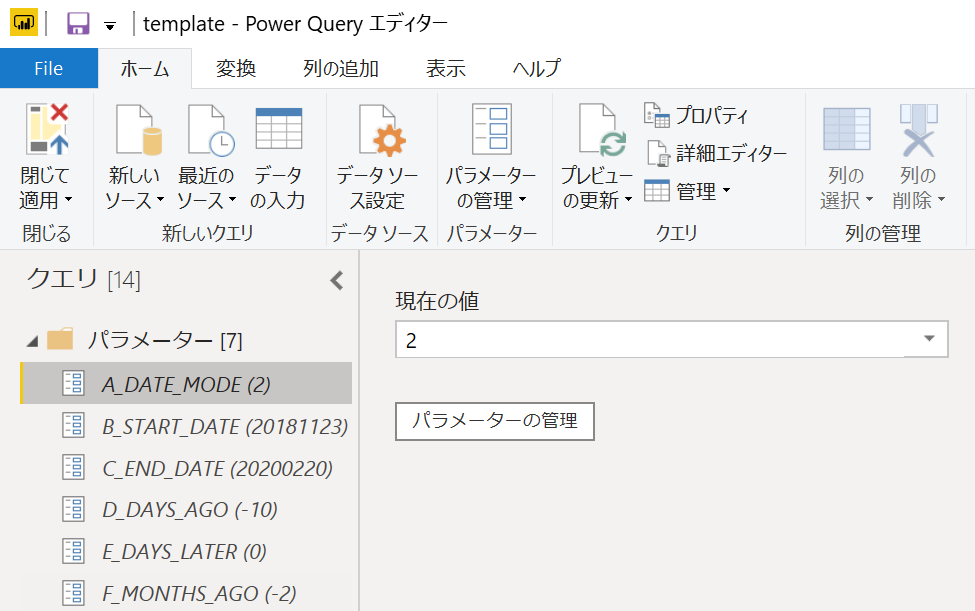
Although it's just specifying a date range, I've added a mode selection feature to accommodate multiple patterns for user convenience.
① Date Specification Mode
This mode creates a calendar for the specified start and end dates.
▼ Parameter Configuration (Prerequisite)
A_DATE_MODE = 0
▼ Parameter Configuration (Items Requiring Configuration)
B_START_DATE = Any YYYYMMDD [e.g., 20200101]
C_END_DATE = Any YYYYMMDD [e.g., 20200131]
② Days Ago Mode
This mode creates a calendar starting from today's date and going back a specified number of days.
▼ Parameter Configuration (Prerequisite)
A_DATE_MODE = 1
▼ Parameter Configuration (Items Requiring Configuration)
D_DAYS_AGO = Number of days to go back from today [e.g., -5 (5 days ago)]
E_DAYS_LATER = Number of days to move forward from today [e.g., 2 (2 days later)]
Fetching Dates Based on Modes
To calculate dates corresponding to the aforementioned modes, the following approach is taken. The START_DATE and END_DATE are prepared for the later Calendar query.
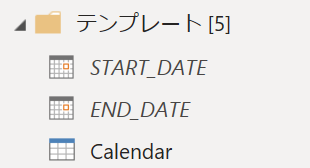
▼ Query: START_DATE
let
    // For A_date_mode = 0 (Date Specified)
    start_date_0 = Date.FromText(Text.Start(B_START_DATE,4) & "," & Text.Middle(B_START_DATE,4,2) & "," & Text.End(B_START_DATE,2)),

    // For A_date_mode = 1 (Days Ago)
    now_1 = DateTime.LocalNow() ,
    start_date_1 = DateTime.Date(Date.AddDays(now_1,D_DAYS_AGO)),

    // For A_date_mode = 2 (Months Ago)
    now_2 = DateTime.LocalNow() ,
    start_month_2 = DateTime.Date(Date.AddMonths(now_2,F_MONTHS_AGO)),
    start_date_2 = DateTime.Date(Date.AddDays(start_month_2,-Date.Day(start_month_2)+1)),

    // Fetching date based on mode
    start_date_ori = if A_DATE_MODE = 0 then start_date_0 else (if A_DATE_MODE = 1 then start_date_1 else start_date_2)

in
    start_date_ori
▼ Query: END_DATE
let
    // For A_date_mode = 0 (Date Specified)
    end_date_0 = Date.FromText(Text.Start(C_END_DATE,4) & "," & Text.Middle(C_END_DATE,4,2) & "," & Text.End(C_END_DATE,2)),

    // For A_date_mode = 1 (Days Ago)
    now_1 = DateTime.LocalNow() ,
    end_date_1 = DateTime.Date(Date.AddDays(now_1,E_DAYS_LATER)),

    // For A_date_mode = 2 (Months Ago)
    now_2 = DateTime.LocalNow() ,
    end_date_2 = DateTime.Date(Date.AddDays(now_2,E_DAYS_LATER)),

    // Fetching date based on mode
    end_date_ori = if A_DATE_MODE = 0 then end_date_0 else (if A_DATE_MODE = 1 then end_date_1 else end_date_2)

in
    end_date_ori
Create an empty query and use the Advanced Editor to copy and paste the above code to make it usable.
Creating the Calendar
The calendar is created for the specified period based on the mode configured in the parameters.
▼ Query: Calendar
let
    Source = List.Generate(
                    ()=>[Date=START_DATE, DayOfWeek=Date.DayOfWeekName(Date)],
                    each [Date]<=END_DATE,
                    each [Date=Date.AddDays([Date],1),DayOfWeek=Date.DayOfWeekName(Date)]
             ),
    Custom = Table.FromRecords(Source),
    AddedCustom = Table.AddColumn(Custom, "YearMonth", each Number.ToText(Date.Year([Date])) & Text.PadStart(Number.ToText(Date.Month([Date])),2,"0")),
    InsertedMonthWeek = Table.AddColumn(AddedCustom, "MonthWeek", each Date.WeekOfMonth([Date]), Int64.Type)
in
    InsertedMonthWeek
The result of this query will look something like this:
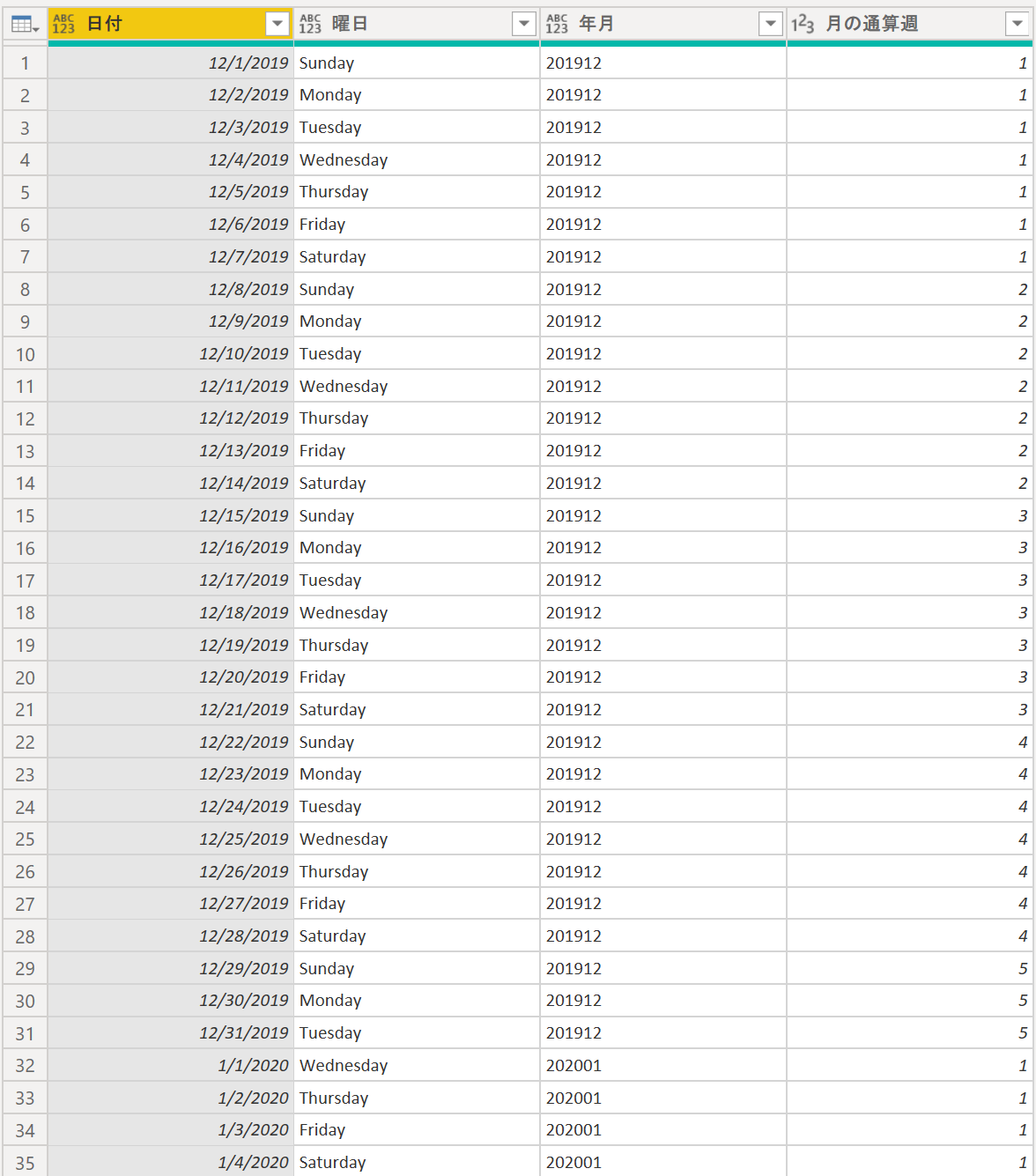
This concludes the process of generating a calendar for a specific period.
That's it!
Related plants
More Tech articles →Power Query | How to Load Dynamic SQL Results (Power BI)
I'll explain how to dynamically execute SQL by linking SQL query conditions (e.g., within the WHERE clause) with Power Query parameters.
#power-query#power-bi#sqlSpec for Codex: Seamless Spec‑Driven Development in VS Code
A VS Code extension that brings Kiro-compatible spec‑driven workflows to Codex CLI—manage Specs, Steering Docs, and Prompts visually and run tasks inline.
#vscode#codex#sddmulti-agent-ff15: Transforming AI Agents from 'Tools' to 'Comrades'
A multi-agent system where 6 AI agents operate in parallel. Zero-cost coordination accelerates development with a revolutionary new approach
#ai#multi-agent#opencode