GitHub Copilot コードレビュー機能の検証:独自ルールの適用と出力制御
GitHub Copilotにプロジェクト独自のルールを認識させ、指摘を行わせる検証結果と、プロンプトエンジニアリングによる出力制御について解説します。
GitHub Copilot のコードレビュー機能をプロジェクトに導入する際、既存のコーディング規約をどの程度遵守させられるかは重要なポイントです。本記事では、Copilot にプロジェクト独自のルールを認識させ、指摘を行わせる検証結果について解説します。また、レビューコメントのフォーマット崩れという課題に対し、ドキュメントへの指示追加(プロンプトエンジニアリング)によって解決した事例も紹介します。
検証の目的
本検証の主な目的は以下の2点です。
- 独自ルールの適用: リポジトリ内のドキュメントに定義されたカスタムルールを Copilot が理解し、適切に指摘できるかを確認する。
- 出力の制御: Copilot の出力フォーマットに不備があった場合、自然言語による指示で改善可能かを確認する。
検証環境の準備
検証にあたり、ルール定義ファイルと、意図的にルールに違反するテストコードを用意しました。
ルール定義 (docs/code-review-considerations.md)
以下の3つのルールを定義しました。
any型の使用禁止- 関数の戻り値の型定義を必須化
- 非nullアサーション (
!) の使用禁止
テストコード (src/violation-test.ts)
上記のルールに違反する TypeScript コードを作成しました。
// This file is intentionally created to violate code review rules for testing purposes.

interface User {
  name: string;
  email?: string;
}

// Violation 1: Avoid `any` type
// Violation 2: Explicit Return Types (missing return type)
function processUserData(data: any) {
  console.log("Processing data: " + data);
  return { processed: true };
}

// Violation 3: No Non-null Assertions
function getUserName(user: User): string {
  // Using ! operator on a potentially undefined property
  const emailLength = user.email!.length;
  return user.name + " (" + emailLength + ")";
}

const rawData: any = "some raw data";
processUserData(rawData);
検証プロセスと課題への対応
初回レビューとフォーマットの問題
Pull Request を作成し、Copilot をレビュアーにアサインしたところ、ルール違反自体は正しく検出されました。
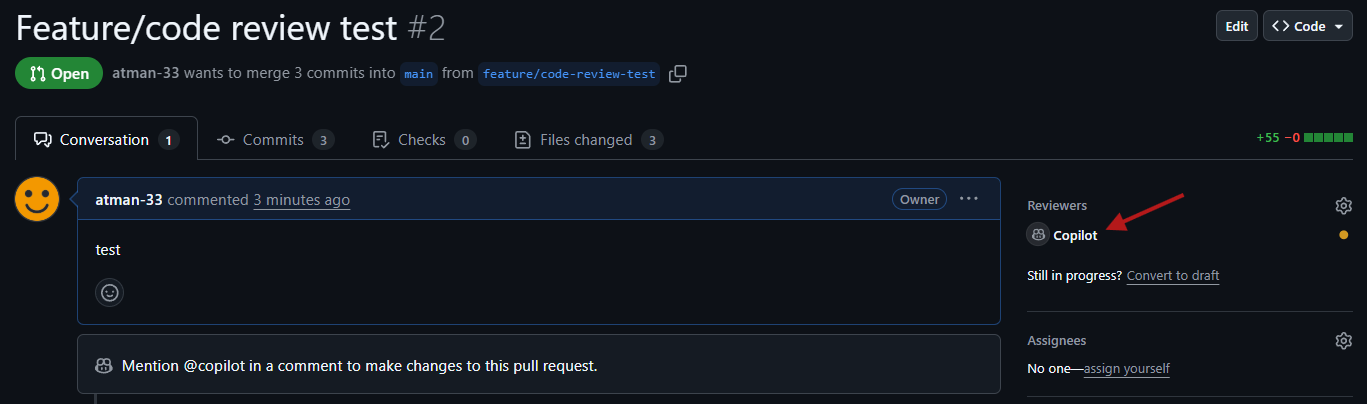
しかし、レビューコメント内の改行がリテラルの \n として出力され、可読性が著しく低い状態となりました。
問題の出力例:
Avoid using the `any` type.\nUse a specific type or `unknown` instead.
プロンプトエンジニアリングによる解決
この問題を解決するため、ルール定義ファイル(docs/code-review-considerations.md)の冒頭に、Copilot に対するメタ的な指示(Note to Copilot)を追加しました。具体的には、「改行文字 \n をそのまま出力するのではなく、実際の改行として Markdown を整形すること」を指示しました。
追加した指示:
> **Note to Copilot:** When generating review comments, please use **actual line breaks** in the Markdown text instead of printing the literal `\n` characters. Ensure the output is properly formatted multi-line Markdown.
修正後の結果
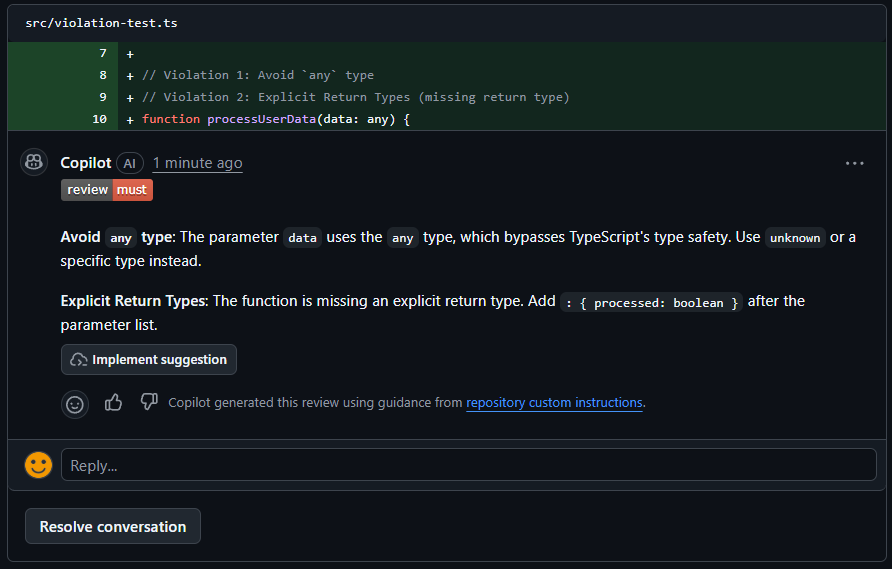
指示を追加した後に再度レビューを実施した結果、改行が正しくレンダリングされ、可読性の高い Markdown 形式のコメントが得られました。
結論
検証の結果、GitHub Copilot はリポジトリ内のドキュメントを参照し、独自の規約に基づいたレビューが可能であることが確認できました。また、出力フォーマットに問題がある場合でも、ドキュメント内に自然言語で具体的な指示を記述することで、Copilot の挙動を効果的に制御できます。
プロジェクト固有のルールを適用する際は、単にルールを羅列するだけでなく、Copilot への指示(メタプロンプト)を適切に配置することが、質の高いレビューを引き出す鍵となります。
添付資料: 検証に使用したファイル
1. .github/copilot-instructions.md
When asked to perform a code review or when assigned as a reviewer on a GitHub PR, please read `docs/code-review-considerations.md` before responding.
2. docs/code-review-considerations.md
# Code Review Considerations
> **Note to Copilot:** When generating review comments, please use **actual line breaks** in the Markdown text instead of printing the literal `\n` characters. Ensure the output is properly formatted multi-line Markdown.
## Must
When finding issues related to the following points, please include the badge  in your review comment.
1. **Avoid `any` type**: Do not use `any`. Use `unknown` or specific types to ensure type safety.
2. **Explicit Return Types**: All functions must have explicit return types.
3. **No Non-null Assertions**: Avoid using the non-null assertion operator (`!`). Use optional chaining or type narrowing instead.
3. src/violation-test.ts
// This file is intentionally created to violate code review rules for testing purposes.

interface User {
  name: string;
  email?: string;
}

// Violation 1: Avoid `any` type
// Violation 2: Explicit Return Types (missing return type)
function processUserData(data: any) {
  console.log("Processing data: " + data);
  return { processed: true };
}

// Violation 3: No Non-null Assertions
function getUserName(user: User): string {
  // Using ! operator on a potentially undefined property
  const emailLength = user.email!.length;
  return user.name + " (" + emailLength + ")";
}

const rawData: any = "some raw data";
processUserData(rawData);
関連する植物
GitHub Copilot でナレッジを蓄えて自己進化するアドバイザーシステムを作ってみた
GitHub Copilotのエージェント機能を使って、ナレッジベースを評価・改善する自己進化型のアドバイザーシステムを構築。複数エージェントが協調して動作し、自動的に回答品質を向上させる仕組みを検証しました。
#github-copilot#ai#agentWSL環境におけるopencodeとoh-my-opencodeの導入ガイド
WSL環境にopencodeとoh-my-opencodeを導入し、Claude、GPT-5、Geminiなど複数のAIモデルをエージェントとして活用する方法を解説。マルチエージェント管理で開発効率を最大化します。
#opencode#ai#wslGitHub RulesetでCopilotの自動コードレビューを設定する方法
GitHub Rulesetを使用して、特定のブランチに対するプルリクエストでGitHub Copilotによる自動コードレビューを有効にする手順を解説します。
#github#github-copilot#automation