VBA | Retrieving Data from Another Excel File
An Excel macro that retrieves data recorded in another Excel file
I built a macro that retrieves data recorded in another Excel file, and I'm sharing it here.
【Download the Excel file here】
Overview
Running the Excel macro copies over the data from the other Excel file you specify.
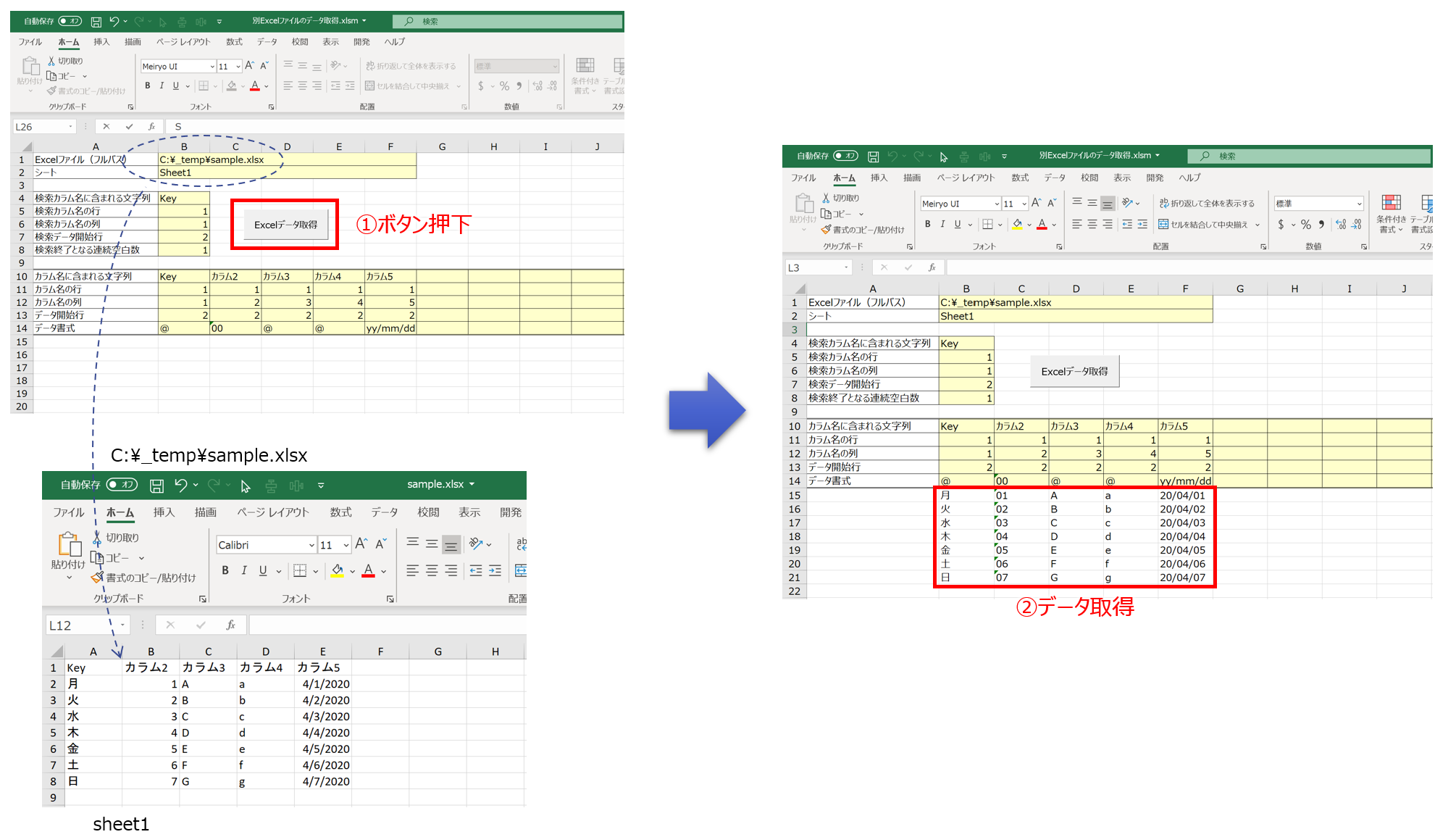
Package Structure
The structure inside the Excel macro is as follows.
(Only the modules used are listed below.)
別Excelファイルのデータ取得.xlsm
├標準モジュール
|   ├modCmnFunction
|   ├modExcelExtractor
|
クラスモジュール
    ├ExcelExtractor
Source Code Explanation
①ExcelExtractor
This is the class responsible for extracting data from another Excel file.
The explanation is written as comments.
' ---- ---- ---- ---- ---- ---- ---- ---- ---- ---- ---- ---- ---- ---- ----
' ExcelExtractor クラス
' ---- ---- ---- ---- ---- ---- ---- ---- ---- ---- ---- ---- ---- ---- ----

Option Explicit

' ---- ---- ---- ---- ---- ---- ---- ---- ---- ---- ---- ---- ---- ---- ----
' 【活用手順 例】
' ① インスタンス生成
' ② setFileSheet   :データを読み込むExcel情報をインプット
' ②´(データ取得に時間が掛かる場合、ここで抽出元のExcelファイルを開いておく)
' ③ setDataRows    :データを読み込む開始行から終了行を決定
' ④ setDataArray   :特定の列に対するデータを一時的に格納
' ⑤ pasteData      :指定したExcelファイルのセルに格納データを貼り付け
' ---- ---- ---- ---- ---- ---- ---- ---- ---- ---- ---- ---- ---- ---- ----

' メンバ変数(Me.で参照可能とするためpublic)
Public target As String         ' フォルダ名 + "[" + ファイル名 + "]" + シート名 + "!"
Public dataFirstRow As Long     ' 抽出元のExcelデータが格納されている最初の行
Public dataLastRow As Long      ' 抽出元のExcelデータが格納されている最後の行

Private data() As Variant       ' 抽出元のExcelデータを格納する配列

' ---- ---- ---- ---- ---- ---- ---- ---- ---- ---- ---- ---- ---- ---- ----
' brief : コンストラクタ
' note  :
' ---- ---- ---- ---- ---- ---- ---- ---- ---- ---- ---- ---- ---- ---- ----
Private Sub Class_Initialize()

    ReDim data(0)

End Sub

' ---- ---- ---- ---- ---- ---- ---- ---- ---- ---- ---- ---- ---- ---- ----
' brief : データを読み込む対象Excelのファイル名(フルパス)、シート名を設定
' note  :
' ---- ---- ---- ---- ---- ---- ---- ---- ---- ---- ---- ---- ---- ---- ----
Public Sub setFileSheet(filePath As String, sheetName As String)

    Dim path As String, buf As String

    ' ファイルが存在しなければ終了
    If Dir(filePath) = "" Then
        MsgBox (filePath & " が存在しません。" & Chr(13) _
            & "フォルダ名とファイル名を確認して下さい。")
        Exit Sub
    End If

    ' ファイル名に[]を付ける
    path = Replace(filePath, Dir(filePath), "[" & Dir(filePath) & "]")
    Debug.Print path

    ' 対象ワークシート名を取得
    Me.target = "'" & path & sheetName & "'!"


    ' ワークシート名が正しいかどうか、まず読み込んでみる
    On Error Resume Next
    buf = ExecuteExcel4Macro(Me.target & "R1C1")
    If Err <> 0 Then
        MsgBox "ワークシート [ " & sheetName & " ] を読めませんでした。", vbExclamation
        Exit Sub
    End If
    On Error GoTo 0 '// エラー処理の命令取り消し

    Debug.Print target

End Sub

' ---- ---- ---- ---- ---- ---- ---- ---- ---- ---- ---- ---- ---- ---- ----
' brief : データが入っている開始行・終了行を特定
' note  : カラム名が存在するならば、データ検索開始行から下側に検索を進めて最終行を特定する。
'         ※下側への検索時、空白数が連続して設定数未満であれば検索を進める。
' ---- ---- ---- ---- ---- ---- ---- ---- ---- ---- ---- ---- ---- ---- ----
Public Sub setDataRows(fieldName As String, fieldRow As Long, fieldCol As Long, dataFirstRow As Long, serchEndBlankCount As Long)

    Dim i As Long
    Dim buf As String
    Dim blankCount As Long

    ' カラム名が存在しなければ終了
    If isExistedFieldName(fieldName, fieldRow, fieldCol) = False Then
        MsgBox "Excel台帳にカラム名 " & fieldName & " が存在しません。"
        End
    End If

    ' データの読み込み
    i = 0
    blankCount = 0

    Do While blankCount < serchEndBlankCount

        ' データを読込
        buf = ExecuteExcel4Macro(Me.target & "R" & dataFirstRow + i & "C" & fieldCol)

        If buf = "0" Then blankCount = blankCount + 1 Else blankCount = 0    ' セルが空白ならブランクカウントに+1

        i = i + 1
    Loop

    Me.dataFirstRow = dataFirstRow
    Me.dataLastRow = dataFirstRow + i - blankCount - 1
    If Me.dataLastRow < Me.dataFirstRow Then Me.dataLastRow = Me.dataFirstRow

    Debug.Print "検索による データ開始:" & Me.dataFirstRow & " データ終了:" & Me.dataLastRow

End Sub

' ---- ---- ---- ---- ---- ---- ---- ---- ---- ---- ---- ---- ---- ---- ----
' brief : 指定したExceデータを配列に格納する。
' note  : 主に ① setDataArray ② pasteData をセットで使う。
' ---- ---- ---- ---- ---- ---- ---- ---- ---- ---- ---- ---- ---- ---- ----
Public Sub setDataArray(fieldName As String, fieldRow As Long, fieldCol As Long)

    Dim i As Long
    Dim buf As String

    ' カラム名が存在しなければ終了
    If isExistedFieldName(fieldName, fieldRow, fieldCol) = False Then
        MsgBox "Excel台帳にカラム名 " & fieldName & " が存在しません。"
        ReDim data(0)
        Exit Sub
    End If

    ' 格納データをクリア
    Call clearData


    ' データの読み込み
    For i = Me.dataFirstRow To Me.dataLastRow

        buf = ExecuteExcel4Macro(Me.target & "R" & i & "C" & fieldCol)
        addData buf

    Next

End Sub

' ---- ---- ---- ---- ---- ---- ---- ---- ---- ---- ---- ---- ---- ---- ----
' brief : 指定したExcelファイルの特定セルに格納していたデータをセット
' note  : 主に ① setDataArray ② pasteData をセットで使う。
' ---- ---- ---- ---- ---- ---- ---- ---- ---- ---- ---- ---- ---- ---- ----
Public Sub pasteData(Workbook As Workbook, sheetName As String, row As Long, col As Long)

    Dim i As Long

    For i = 0 To countData

        Workbook.Worksheets(sheetName).Cells(row + i, col) = getDataVal(i)
        Debug.Print "i:" & i & "  行:" & row + i & "  値:" & getDataVal(i)

    Next

End Sub
' ---- ---- ---- ---- ---- ---- ---- ---- ---- ---- ---- ---- ---- ---- ----
' brief : 別Excelのカラム名が存在するか判定する関数
' note  : Excelの行列が変わっていないかどうかのチェック用
' ---- ---- ---- ---- ---- ---- ---- ---- ---- ---- ---- ---- ---- ---- ----
Private Function isExistedFieldName(fieldName As String, row As Long, col As Long) As Boolean

    Dim buf As String

    buf = ExecuteExcel4Macro(Me.target & "R" & row & "C" & col)

    If InStr(buf, fieldName) > 0 Then isExistedFieldName = True _
        Else isExistedFieldName = False

End Function

' ---- ---- ---- ---- ---- ---- ---- ---- ---- ---- ---- ---- ---- ---- ----
' brief : データの値を配列に追加
' note  :
' ---- ---- ---- ---- ---- ---- ---- ---- ---- ---- ---- ---- ---- ---- ----
Private Sub addData(ByVal val)
    On Error Resume Next

    Dim i

    i = countData

    If (IsEmpty(data(i)) = True) Then
        data(i) = val
    Else
        ReDim Preserve data(i + 1)
        data(i + 1) = val
    End If

End Sub

' ---- ---- ---- ---- ---- ---- ---- ---- ---- ---- ---- ---- ---- ---- ----
' brief : 指定要素位置の値を取得する
' note  : JavaのArrayList.Getと一緒
' ---- ---- ---- ---- ---- ---- ---- ---- ---- ---- ---- ---- ---- ---- ----
Private Function getDataVal(index)
    Dim v_ret As Variant

    If (index > countData) Then
        v_ret = Null
    Else
        v_ret = data(index)
    End If

    getDataVal = v_ret
End Function

' ---- ---- ---- ---- ---- ---- ---- ---- ---- ---- ---- ---- ---- ---- ----
' brief : データ配列の要素数を調べる。
' note  :
' ---- ---- ---- ---- ---- ---- ---- ---- ---- ---- ---- ---- ---- ---- ----
Private Function countData() As Long
    countData = UBound(data)
End Function

' ---- ---- ---- ---- ---- ---- ---- ---- ---- ---- ---- ---- ---- ---- ----
' brief : データ配列をクリアする。
' note  :
' ---- ---- ---- ---- ---- ---- ---- ---- ---- ---- ---- ---- ---- ---- ----
Private Sub clearData()
    ReDim data(0)
End Sub
②modExcelExtractor
This is the module that drives ExcelExtractor.
The explanation is written as comments.
Option Explicit

Const MAIN_DATA_FIELD_NAME_DEFINED_ROW = 10         ' 抽出するExcelデータのフィールド名に含まれる文字列を定義している行
Const MAIN_DATA_FIELD_ROW_DEFINED_ROW = 11          ' 抽出するExcelデータのフィールド名が含まれる行を定義している行
Const MAIN_DATA_FIELD_COL_DEFINED_ROW = 12          ' 抽出するExcelデータの列を定義している行
Const MAIN_DATA_START_ROW_DEFINED_ROW = 13          ' 抽出するExcelデータの開始行を定義している行
Const MAIN_DATA_FORMAT_DEFINED_ROW = 14             ' 抽出するExcelデータの書式を定義している行

Const MAIN_DATA_START_ROW = 15                      ' データ格納開始行
Const MAIN_DATA_START_COL = 2                       ' データ格納開始列

Dim mainSheet As Worksheet

Dim excelPath As String
Dim excelSheetName As String

Dim excelSearchFieldName As String
Dim excelSearchFieldNameRow As Long
Dim excelSearchFieldNameCol As Long
Dim excelSearchDataStartRow As Long
Dim excelSearchEndMultiBlank As Long

Dim extractor As ExcelExtractor

' ---- ---- ---- ---- ---- ---- ---- ---- ---- ---- ---- ---- ---- ---- ----
' brief : Excelのデータ取得
' note  :
' ---- ---- ---- ---- ---- ---- ---- ---- ---- ---- ---- ---- ---- ---- ----
Public Sub extractExcelData()

    Set extractor = New ExcelExtractor

    ' Excelデータ用のセルクリア
    clearDataSimplified ActiveSheet, MAIN_DATA_START_ROW, MAIN_DATA_START_COL

    ' ExcelやDBの設定情報取得
    setInfo

    ' データ取得するExcelを設定
    extractor.setFileSheet excelPath, excelSheetName

    ' Excelをオープン(by modCmnFunction)
    openFile excelPath

    ' Excelからデータ取得する行の開始と終了を決定
    extractor.setDataRows excelSearchFieldName, excelSearchFieldNameRow, excelSearchFieldNameCol, _
        excelSearchDataStartRow, excelSearchEndMultiBlank

    ' Excelからデータ取得
    pasteExcelData mainSheet

    ' Excelをクローズ(by modCmnFunction)
    closeOpenedFile False

End Sub

' ---- ---- ---- ---- ---- ---- ---- ---- ---- ---- ---- ---- ---- ---- ----
' brief : Excelから基本情報をセット
' note  :
' ---- ---- ---- ---- ---- ---- ---- ---- ---- ---- ---- ---- ---- ---- ----
Private Sub setInfo()

    Set mainSheet = ActiveSheet

    excelPath = ActiveSheet.Cells(1, 2).Value
    excelSheetName = ActiveSheet.Cells(2, 2).Value

    excelSearchFieldName = ActiveSheet.Cells(4, 2).Value
    excelSearchFieldNameRow = ActiveSheet.Cells(5, 2).Value
    excelSearchFieldNameCol = ActiveSheet.Cells(6, 2).Value
    excelSearchDataStartRow = ActiveSheet.Cells(7, 2).Value
    excelSearchEndMultiBlank = ActiveSheet.Cells(8, 2).Value

End Sub

' ---- ---- ---- ---- ---- ---- ---- ---- ---- ---- ---- ---- ---- ---- ----
' brief : Excel台帳からデータをセットする。
' note  :
' ---- ---- ---- ---- ---- ---- ---- ---- ---- ---- ---- ---- ---- ---- ----
Private Function pasteExcelData(sheet As Worksheet)

    Dim i As Long
    Dim col As Variant

    Dim field_name As String
    Dim field_row As Long
    Dim field_col As Long
    Dim format As String

    Debug.Print sheet.Name
    i = 0
    col = sheet.Cells(MAIN_DATA_FIELD_NAME_DEFINED_ROW, MAIN_DATA_START_COL).Value
    Do While col <> ""

        ' Excelからデータを取得するための条件取得
        field_name = sheet.Cells(MAIN_DATA_FIELD_NAME_DEFINED_ROW, MAIN_DATA_START_COL + i)
        field_row = sheet.Cells(MAIN_DATA_FIELD_ROW_DEFINED_ROW, MAIN_DATA_START_COL + i)
        field_col = sheet.Cells(MAIN_DATA_FIELD_COL_DEFINED_ROW, MAIN_DATA_START_COL + i)

        ' Excelのデータを貼り付け
        extractor.setDataArray field_name, field_row, field_col
        extractor.pasteData ThisWorkbook, sheet.Name, MAIN_DATA_START_ROW, MAIN_DATA_START_COL + i

        ' Excelから取得したデータの書式を変更
        format = sheet.Cells(MAIN_DATA_FORMAT_DEFINED_ROW, MAIN_DATA_START_COL + i)
        changeFormatMaxRowBelow sheet, MAIN_DATA_START_ROW, MAIN_DATA_START_COL + i, format

        ' 次の処理へ移る準備
        i = i + 1
        col = sheet.Cells(MAIN_DATA_FIELD_NAME_DEFINED_ROW, MAIN_DATA_START_COL + i).Value
    Loop

End Function
I don't think this Excel macro is often used on its own.
For example, it becomes handy when extended to aggregate data from multiple Excel files, or to register data extracted from an Excel file into a database.
That's it.
Related plants
More Tech articles →Excel VBA Template File (Improved mk2)
I created an Excel VBA template file. Built mainly around class modules, it implements CRUD operations against a database (Oracle) linked to an Excel table.
#excel-vba#oracleVBA | DB Operations – Part 4: Running MERGE from Excel
Excel macro Part 4: [Running MERGE from Excel]
#excel-vba#oracle#sqlVBA | DB Operations - Part 3: Running INSERT, UPDATE, DELETE from Excel
Excel macro Part 3: [Running INSERT, UPDATE, DELETE from Excel]
#excel-vba#oracle#sql