Excel VBA Template File (Improved mk2)
I created an Excel VBA template file. Built mainly around class modules, it implements CRUD operations against a database (Oracle) linked to an Excel table.
Overview
I created an Excel VBA template file. It's built mainly around class modules and implements features such as CRUD operations against a database (Oracle) linked to an Excel table.
The Excel file and its documentation are stored in the following repository.
https://github.com/atman-33/template-excel-vba-mk2
1. Main Features Implemented
- Using data from the Config sheet in VBA
- Connecting to an Oracle database and storing/deleting data in an Excel table
- Excel table operations (sort, filter)
2. Module Structure
|- 標準モジュール/
|   |- Constants        : 共通の定数を記載
|   |- ModuleCommon     : Staticな共通処理を記載
|   |- Tests            : ユニットテスト用コード置き場
|   |- Utils            : 汎用メソッド置き場
|
|- クラスモジュール/
|   |- Config           : Excelシートに指定したConfigを扱うクラス
|   |- DaoAccess        : Access に接続し、CRUD処理を行うDAOクラス
|   |- DaoOracleOra     : Oracle に接続し、CRUD処理を行うDAOクラス
|   |- ExListObject     : テーブル(ListObject)の機能拡張クラス
|   |- IDao             : DAOクラスのインターフェース
|   |- Repository       : DAOクラスを利用するリポジトリクラス
|   |- TableXxx         : Excelテーブルを操作するクラス
|   |- SheetXxx         : Excelシートを操作するクラス
|
3. Sheet Descriptions
Sample1 Sheet
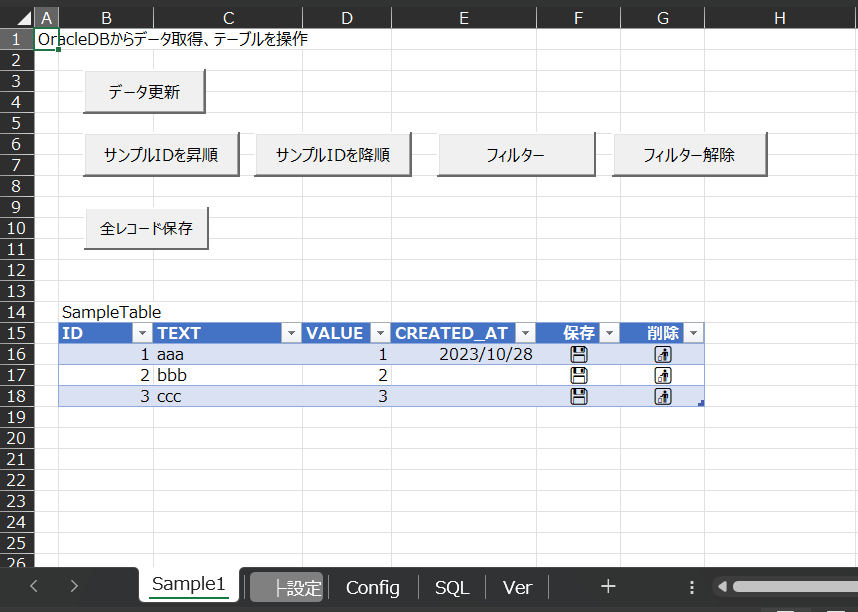
On the Sample1 sheet, you can fetch and modify data from the Oracle DB.
It also implements the ability to sort and filter data that has been pasted into the Excel table after being retrieved from the DB.
Double-clicking the "Save" or "Delete" icon on the Excel table saves or deletes the clicked record in the DB.
The DB connection settings and the SQL used to fetch data are specified in the Config sheet and SQL sheet described below.
Config Sheet
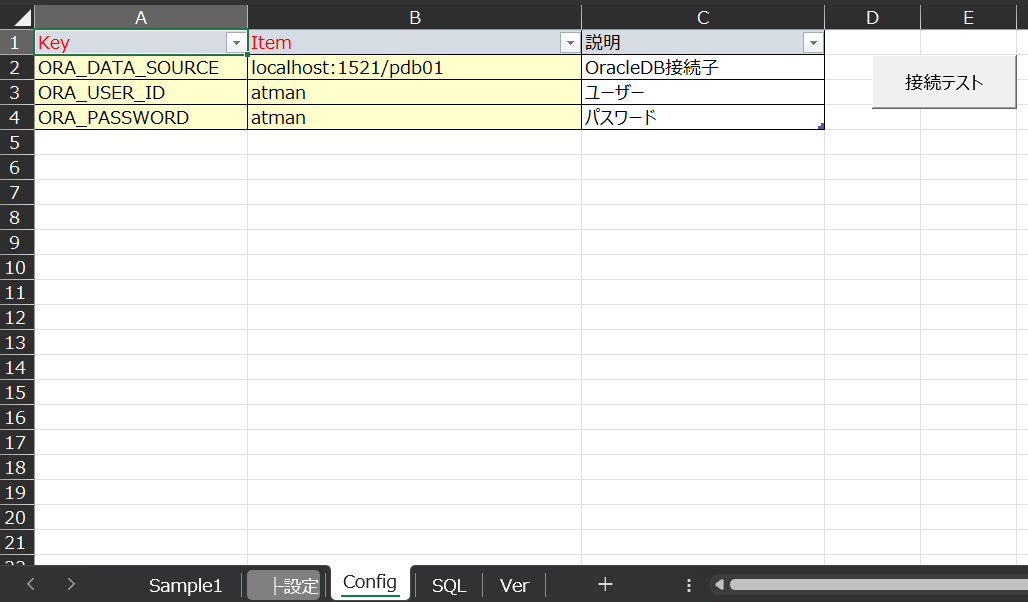
This sheet holds the settings used by VBA, such as DB connection information.
The Key and Item values stored on this sheet can be looked up from the VBA side.
' ---- ---- ---- ---- ---- ---- ---- ---- ---- ---- ---- ---- ---- ---- ----
' クラス:Config
' ---- ---- ---- ---- ---- ---- ---- ---- ---- ---- ---- ---- ---- ---- ----

' ---- 定数設定 ---- '
Const CONFIG_SHEET = "Config"
Const CONFIG_TABLE = "Config_tbl"
Const CONFIG_COL_KEY = "Key"
Const CONFIG_COL_ITEM = "Item"
' ------------------ '

Private dictionary_ As Object

' ---- ---- ---- ---- ---- ---- ---- ---- ---- ---- ---- ---- ---- ---- ----
' Summary : コンストラクタ
' ---- ---- ---- ---- ---- ---- ---- ---- ---- ---- ---- ---- ---- ---- ----
Private Sub Class_Initialize()

    Set dictionary_ = CreateObject("Scripting.Dictionary")

    ' Configテーブルを格納
    Dim table As ListObject
    Set table = ThisWorkbook.Worksheets(CONFIG_SHEET).ListObjects(CONFIG_TABLE)

    ' ConfigテーブルのKeyとItemを辞書に格納
    Dim key As String, Item As String

    Dim i As Long
    For i = 1 To table.ListRows.Count
        key = table.ListColumns(CONFIG_COL_KEY).DataBodyRange(i).Value
        Item = table.ListColumns(CONFIG_COL_ITEM).DataBodyRange(i).Value

        Call dictionary_.Add(key, Item)
    Next i

    ' ---- Debug ---- '
    Dim varItem As Variant
    Dim str As String
    For Each varItem In dictionary_
        str = str & varItem & ":" & dictionary_.Item(varItem) & vbCrLf
    Next

    Debug.Print str
'    Debug.Print dictionary_.Item("ORA_DATA_SOURCE")

    ' --------------- '

End Sub


' ---- ---- ---- ---- ---- ---- ---- ---- ---- ---- ---- ---- ---- ---- ----
' Summary : 指定したKeyのアイテムを取得
' ---- ---- ---- ---- ---- ---- ---- ---- ---- ---- ---- ---- ---- ---- ----
Public Property Get Item(key As String) As Variant
    Item = dictionary_.Item(key)
End Property
To retrieve data from Config, use it like this.
ex:
Dim conf As New Config
Dim source As string

source = conf.Item("ORA_DATA_SOURCE")
SQL Sheet
Specifies the SQL to fetch from the DB and the destination (sheet, table) to paste the data into.
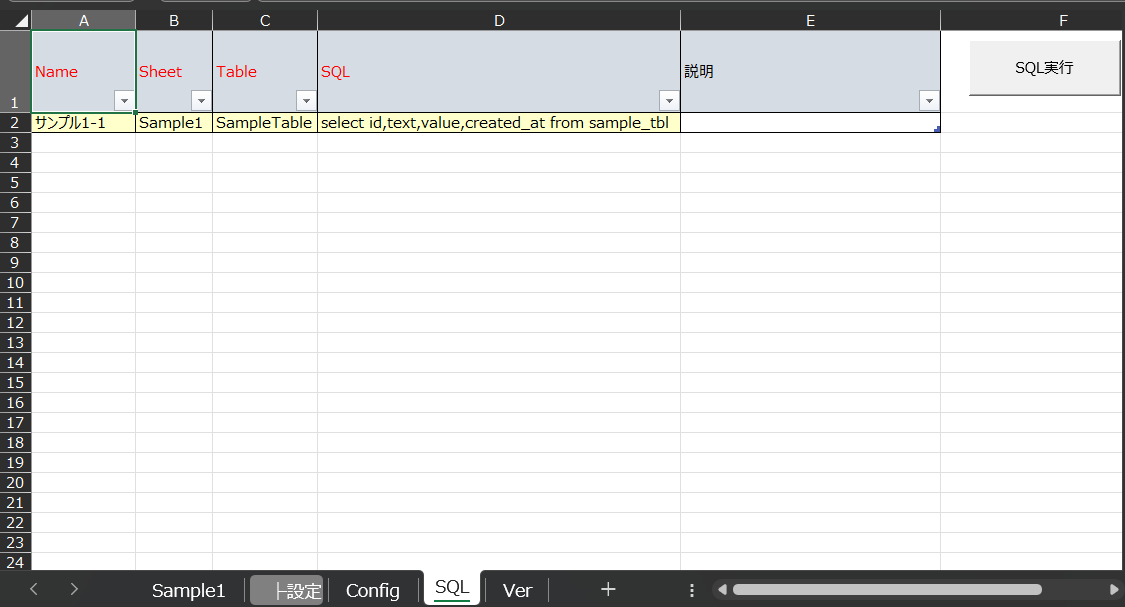
Additional notes on the SQL table:
| Column | Description |
|---|---|
| Name | The name of the SQL (prepared to make the SQL easier to identify; not used by VBA). |
| Sheet | The name of the sheet that contains the table where the SQL results are output. |
| Table | The name of the table where the SQL results are output. |
| SQL | The SQL statement to execute. |
| Description | A comment field for supplementary notes about the SQL, if any. |
Related plants
More Tech articles →VBA | DB Operations – Part 4: Running MERGE from Excel
Excel macro Part 4: [Running MERGE from Excel]
#excel-vba#oracle#sqlVBA | DB Operations - Part 3: Running INSERT, UPDATE, DELETE from Excel
Excel macro Part 3: [Running INSERT, UPDATE, DELETE from Excel]
#excel-vba#oracle#sqlVBA | DB Operations - Part 2: Storing SELECT Results in Excel
Excel macro Part 2: [Storing SELECT results in Excel]
#excel-vba#oracle#sql