VBA | DB Operations – Part 4: Running MERGE from Excel
Excel macro Part 4: [Running MERGE from Excel]
I'll explain the Excel macro for working with a DB.
This article is "Part 4."
Part 1: Handling the Config sheet's settings in VBA
Part 2: Storing SELECT results in Excel
Part 3: Running INSERT, UPDATE, DELETE from Excel
Part 4: Running MERGE from Excel
【Download the Excel file here】
※Revised 2021/2/5
・Switched from ODBC to OraOLEDB.Oracle for the connection
・Fixed how INSERT, UPDATE, and MERGE statements are generated
Overview
For Part 4, in addition to inserting, updating, and deleting rows in the DB (database) table from the data (cell values) stored in the Excel sheet built in Part 3, I've added an insert-or-update (MERGE) operation.
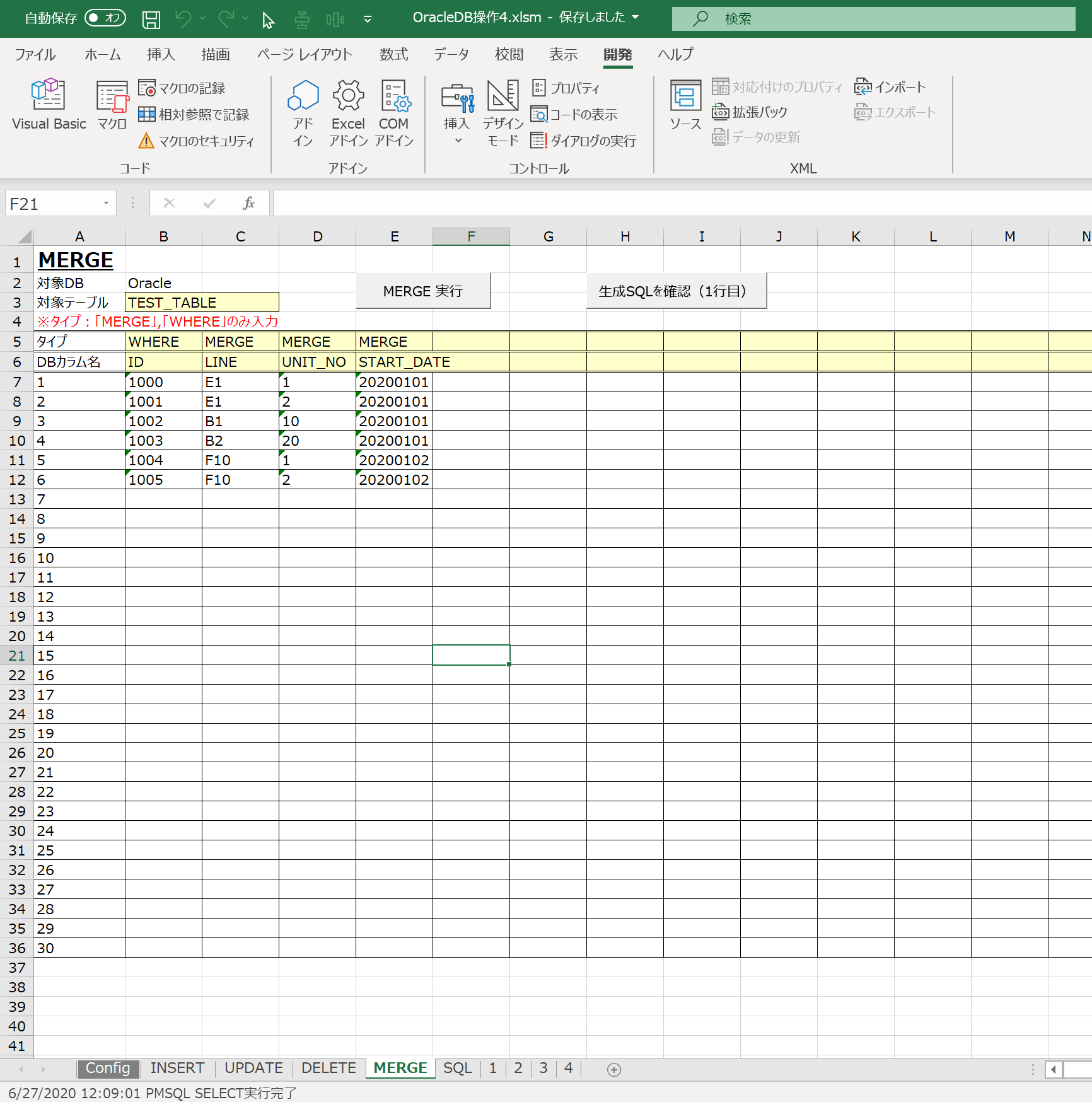
With the MERGE function added, the operations this Excel file can now perform against the Oracle database are as follows.
| Type | Function |
|---|---|
| INSERT | Insert data into the DB table (record insert) |
| UPDATE | Update data stored in the DB table (record update) |
| DELETE | Delete data stored in the DB table (record delete) |
| MERGE | Insert or update data stored in the DB table |
Package Structure
The structure inside the Excel macro is as follows. (Only the modules used are listed.)
Template_ver1.x.x.xlsm
├標準モジュール
|   ├modCmnGlbConst
|   ├modSql
|
クラスモジュール
    ├Configurator
    ├DBManager
Source Code Explanation
Up through the previous part, the macros run from the INSERT, UPDATE, DELETE, and MERGE sheets were each kept as separate, independent functions.
I thought this would be inconvenient when extending functionality going forward, so I've refactored things so that the macros run from each of the INSERT, UPDATE, DELETE, and MERGE sheets now pass through a single function before reaching the database operation class. (See the image below for the idea.)
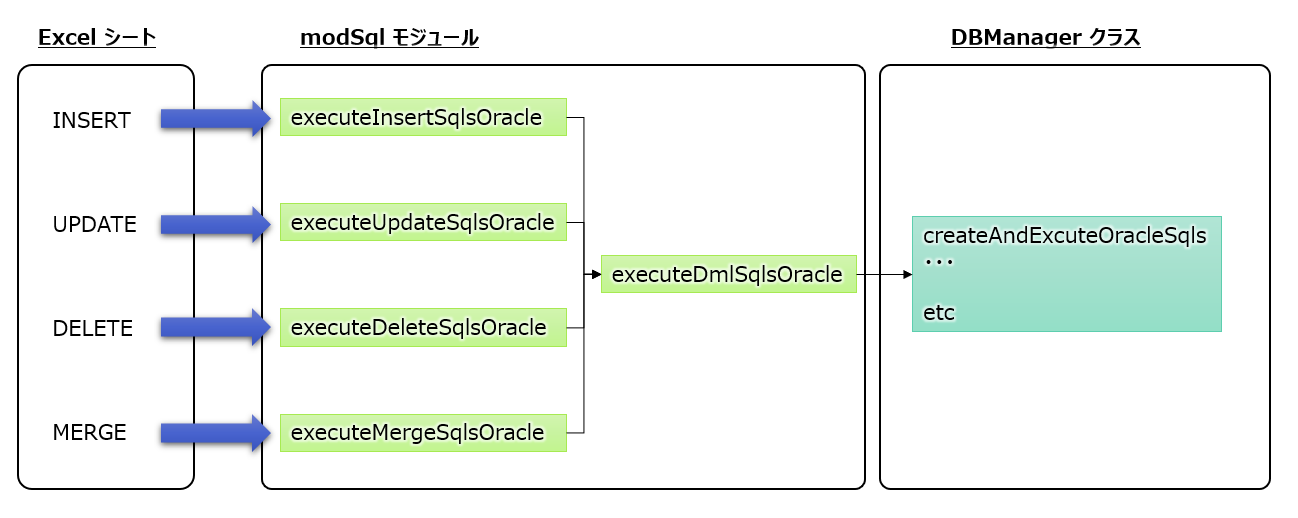
For example, running a MERGE statement calls executeMergeSqlsOracle(), which in turn calls the executeDmlSqlsOracle function.
(Part of the code is shown below — check the VBA inside the Excel file for the full details.)
' ---- ---- ---- ---- ---- ---- ---- ---- ---- ---- ---- ---- ---- ---- ----
' brief : D.各MERGE文を連続実行
' note  : Oracle対応
' ---- ---- ---- ---- ---- ---- ---- ---- ---- ---- ---- ---- ---- ---- ----
Public Sub executeMergeSqlsOracle()

    Dim sheet As Worksheet          ' SQLを生成する情報が格納されているシート
    Dim tableName As String         ' 操作する対象のテーブル

    Set sheet = ThisWorkbook.Worksheets(MERGE_SHEET_NAME)
    tableName = sheet.Cells(TABLE_NAME_ROW, TABLE_NAME_COL)

    executeDmlSqlsOracle "MERGE", tableName, sheet, TYPE_DIFINED_ROW, DB_COL_NAME_DIFINED_ROW, DATA_START_ROW, DATA_START_COL

End Sub

' ---- ---- ---- ---- ---- ---- ---- ---- ---- ---- ---- ---- ---- ---- ----
' brief : 各INSERT, UPDATE, DELETE, MERGE文を連続実行
' note  : Oracle対応
' ---- ---- ---- ---- ---- ---- ---- ---- ---- ---- ---- ---- ---- ---- ----
Private Sub executeDmlSqlsOracle(dmlType As String, tableName As String, sheet As Worksheet _
    , typeDifinedRow As Long, dbColNameDifinedRow As Long, dataStartRow As Long, dataStartCol As Long)

    Dim servicename As String, username As String, password As String

    ' Config 設定の読み込み
    Set config = New Configurator
    config.setData ThisWorkbook.Worksheets(GLB_CONFIG_SHEET), GLB_CONFIG_KEY_COL, GLB_CONFIG_ITEM_COL, GLB_CONFIG_START_ROW

    servicename = config.getItem("SERVICE_NAME")
    username = config.getItem("USERNAME")
    password = config.getItem("PASSWORD")

    ' DB接続
    Set dbManagerOracle = New DBManager
    dbManagerOracle.openOracle servicename, username, password

    ' トランザクション開始
    dbManagerOracle.begintrans

    On Error GoTo err

    ' SQL実行
    dbManagerOracle.createAndExcuteOracleSqls tableName, sheet, typeDifinedRow, dbColNameDifinedRow, dataStartRow, dataStartCol

    ' コミット
    dbManagerOracle.committrans

    ' DB切断
    dbManagerOracle.closeConnection

    Select Case dmlType

        Case "INSERT"
            Application.StatusBar = Now & "SQL INSERT実行完了"

        Case "UPDATE"
            Application.StatusBar = Now & "SQL UPDATE実行完了"

        Case "DELETE"
            Application.StatusBar = Now & "SQL DELETE実行完了"

        Case "MERGE"
            Application.StatusBar = Now & "SQL MERGE実行完了"

    End Select

    Exit Sub

err:
    ' エラー発生時はロールバック
    Debug.Print "エラー番号:" & err.Number & Chr(13) & "エラー内容:" & err.Description
    MsgBox "エラー番号:" & err.Number & Chr(13) & "エラー内容:" & err.Description

    MsgBox "ロールバックを実行し、プログラムを終了します。"
    dbManagerOracle.rollbacktrans

    End

End Sub
That's it for this part. This wraps up the explanation of how to operate an Oracle database from an Excel file macro.
If you build out only the "database operation" part described so far in advance, you can adapt it to a variety of situations by extending it for whatever purpose comes up.
I hope this conveys how valuable it is to have the basic functionality ready ahead of time.
Related plants
More Tech articles →VBA | DB Operations - Part 3: Running INSERT, UPDATE, DELETE from Excel
Excel macro Part 3: [Running INSERT, UPDATE, DELETE from Excel]
#excel-vba#oracle#sqlVBA | DB Operations - Part 2: Storing SELECT Results in Excel
Excel macro Part 2: [Storing SELECT results in Excel]
#excel-vba#oracle#sqlExcel VBA Template File (Improved mk2)
I created an Excel VBA template file. Built mainly around class modules, it implements CRUD operations against a database (Oracle) linked to an Excel table.
#excel-vba#oracle