VBA | DB Operations - Part 2: Storing SELECT Results in Excel
Excel macro Part 2: [Storing SELECT results in Excel]
Let's continue explaining the Excel macro for working with a DB.
This article is "Part 2."
Part 1: Handling the Config sheet's settings in VBA
Part 2: Storing SELECT results in Excel
Part 3: Running INSERT, UPDATE, DELETE from Excel
Part 4: Running MERGE from Excel
【Download the Excel file here】
※Revised 2021/2/5
・Switched from ODBC to OraOLEDB.Oracle for the connection
・Fixed how INSERT, UPDATE, and MERGE statements are generated
Overview
Part 2 explains how to store the results of a SELECT statement in Excel.
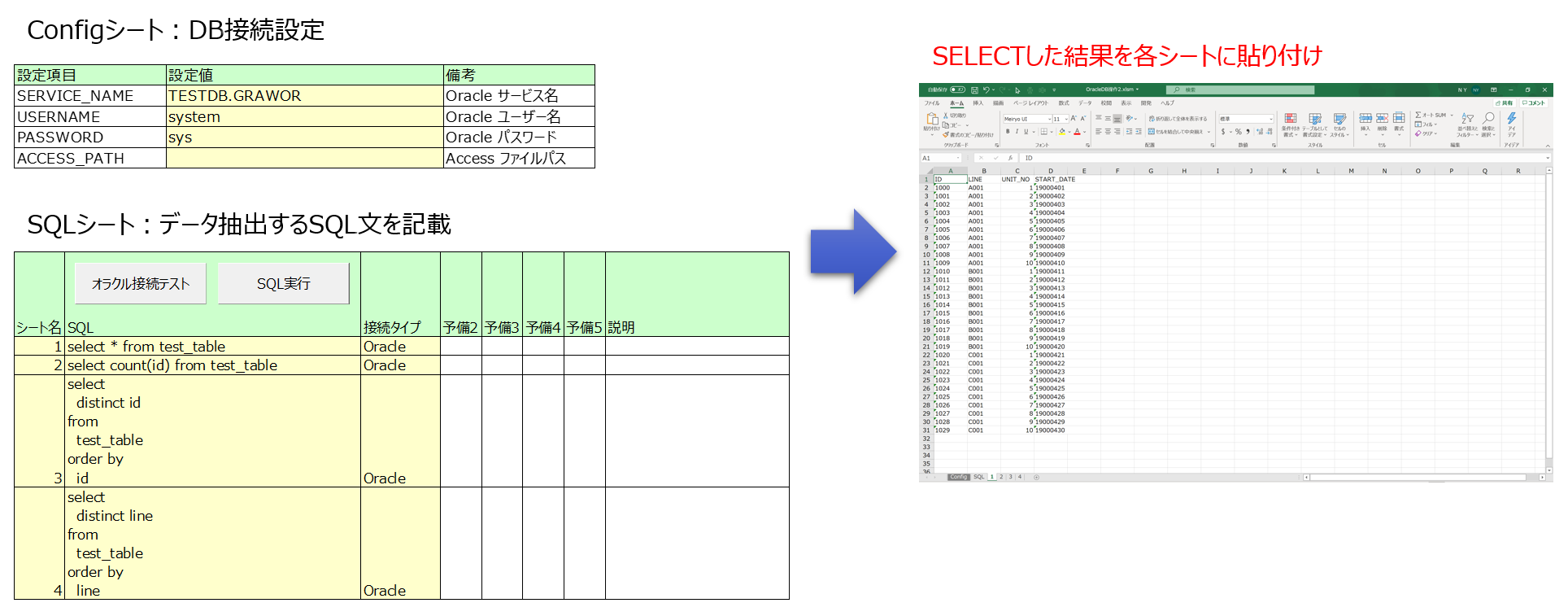
You configure the DB connection in Excel's "Config sheet," write the extraction SQL in the "SQL sheet," and run the macro.
The macro then pastes the SELECT results into each sheet (named according to the sheet name entered in the SQL sheet).
The steps are shown below.
①DB connection settings
Write the DB connection settings in the Config sheet. (Only Oracle is supported as the DB.)
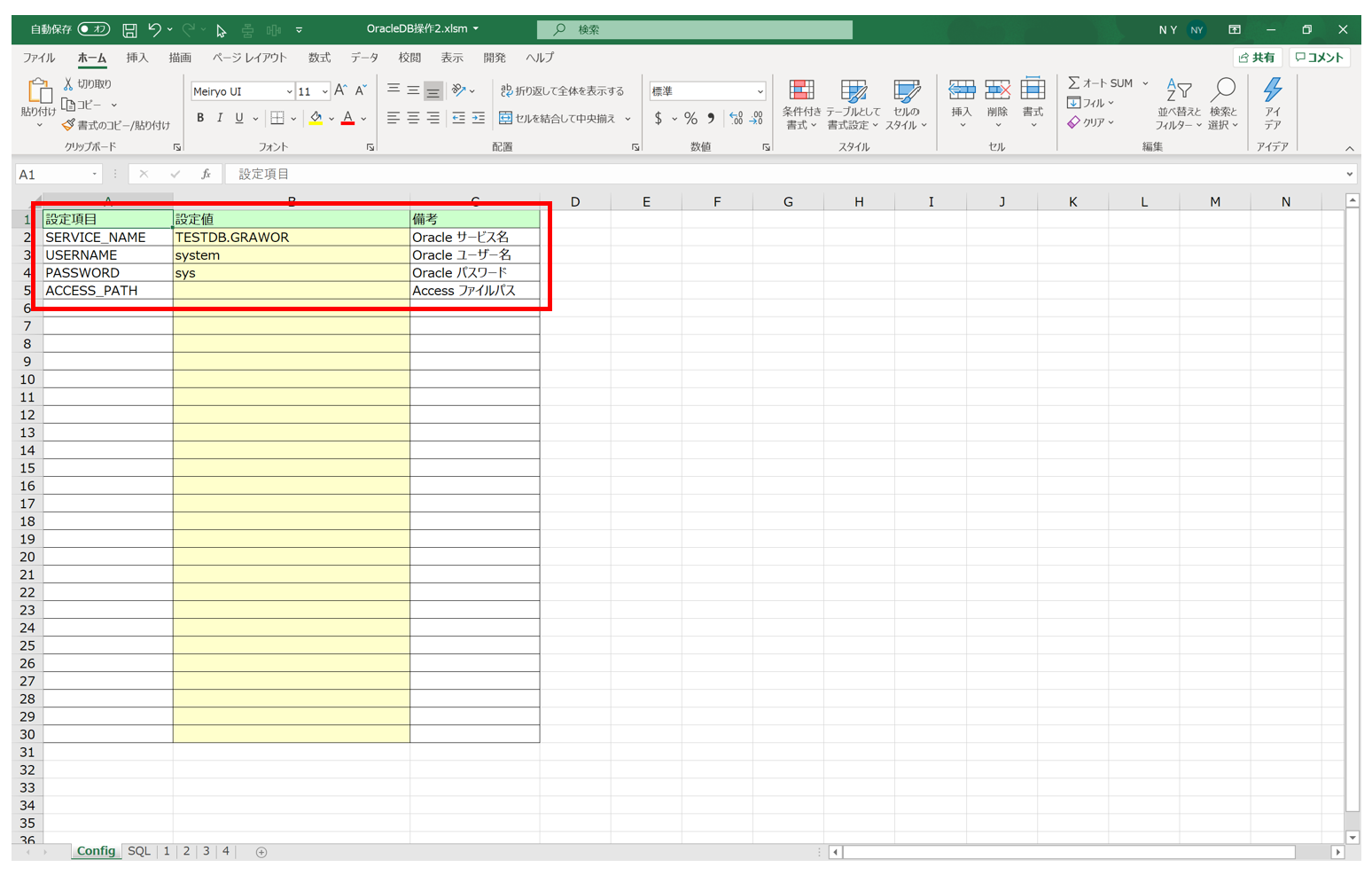
The SERVICE_NAME (service name) is written in the tnsnames.ora file created and configured when installing the Oracle client or server.
Example: In the tnsnames.ora example below, TESTDB.GRAWOR is the service name.
TESTDB =
  (DESCRIPTION =
    (ADDRESS = (PROTOCOL = TCP)(HOST = ***)(PORT = 1521))
    (CONNECT_DATA =
      (SERVER = DEDICATED)
      (SERVICE_NAME = TESTDB.GRAWOR)
    )
  )
②Testing the Oracle connection
Connect to the Oracle DB to confirm that the connection settings in the Config sheet are correct.
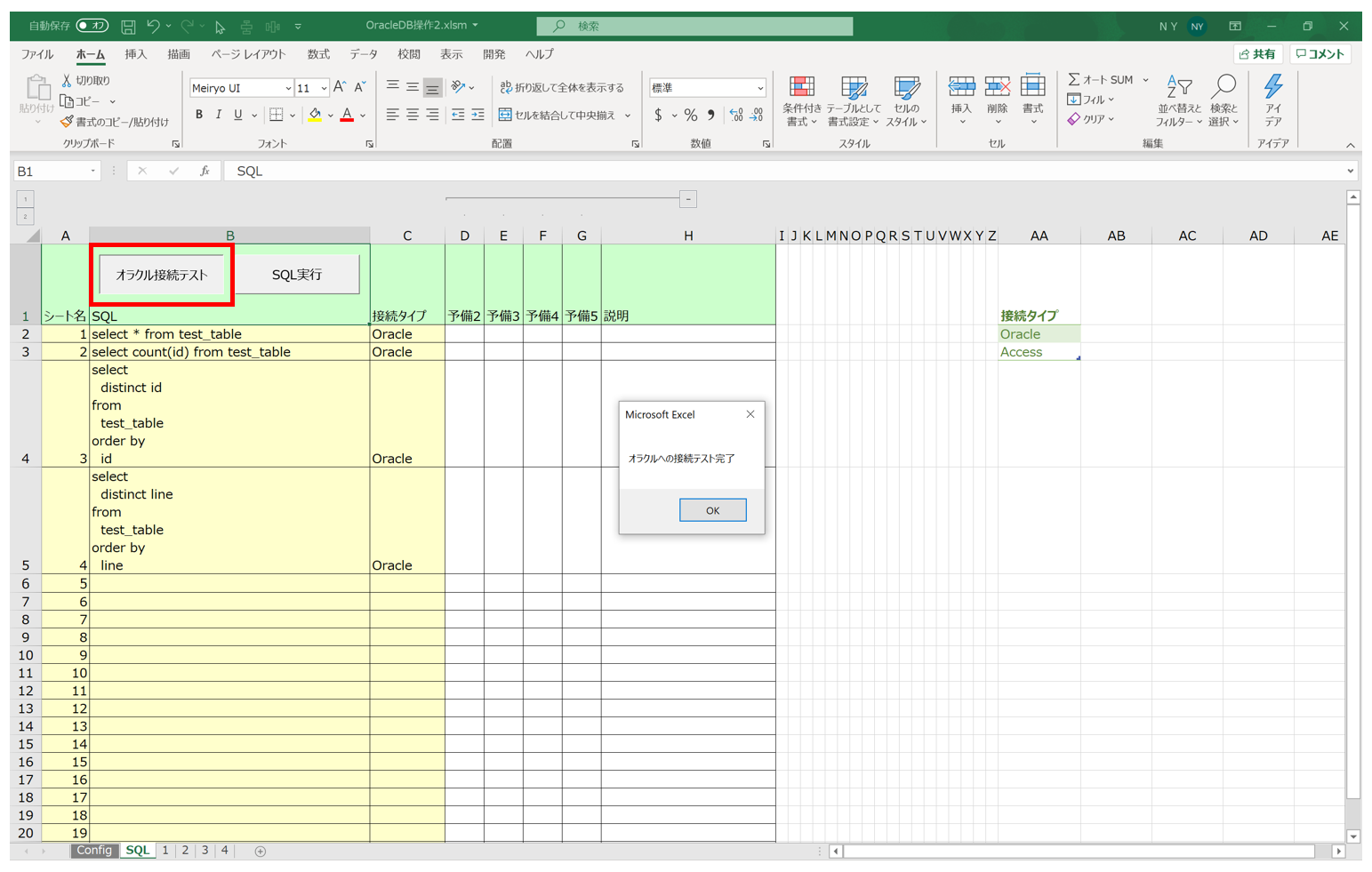
If the message "Oracle connection test completed" is displayed, the connection to the Oracle DB is working fine.
③Running the SQL statement
Clicking the "Run SQL" button executes the SQL statement and pastes the extracted data into each sheet.
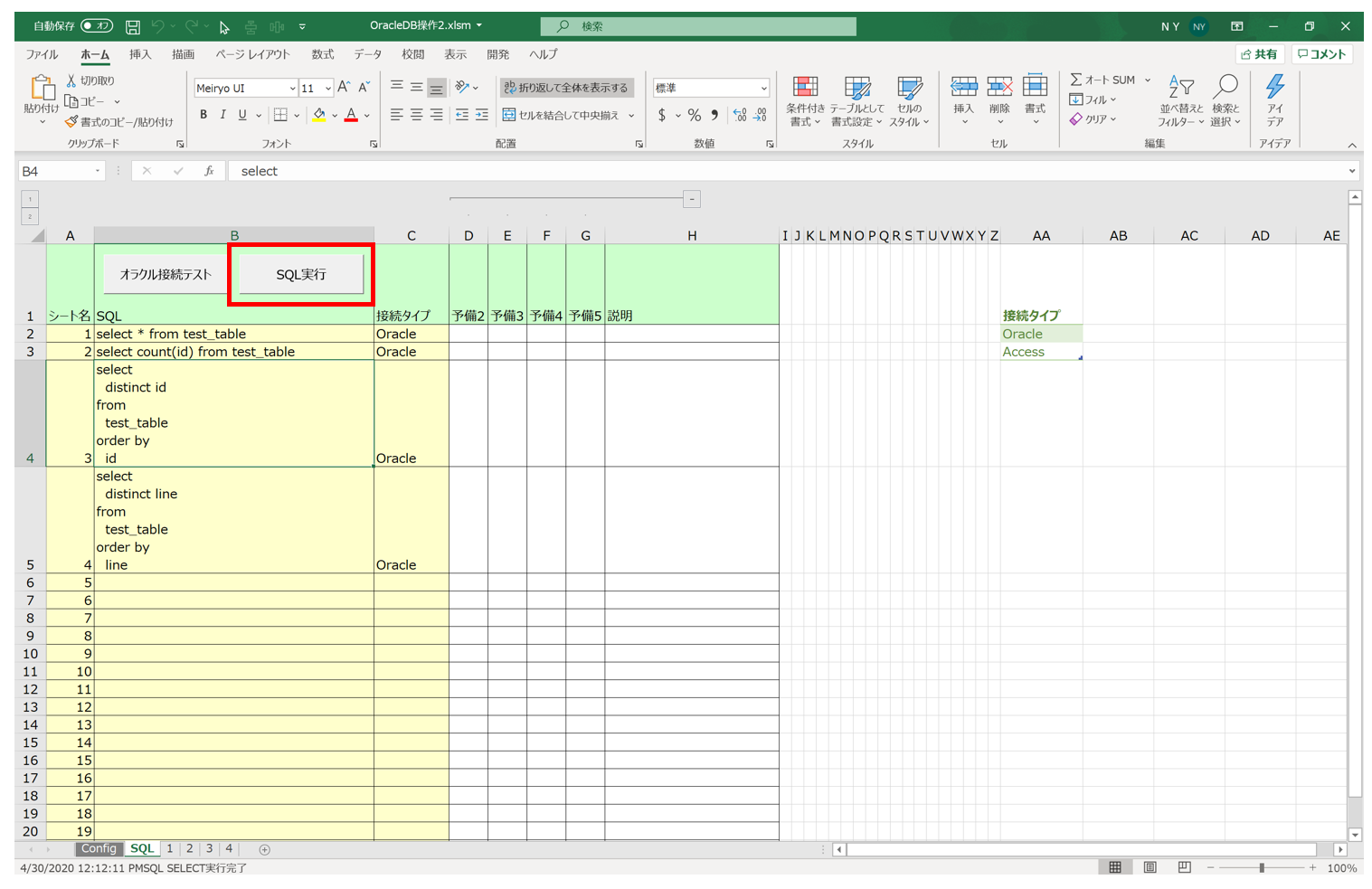
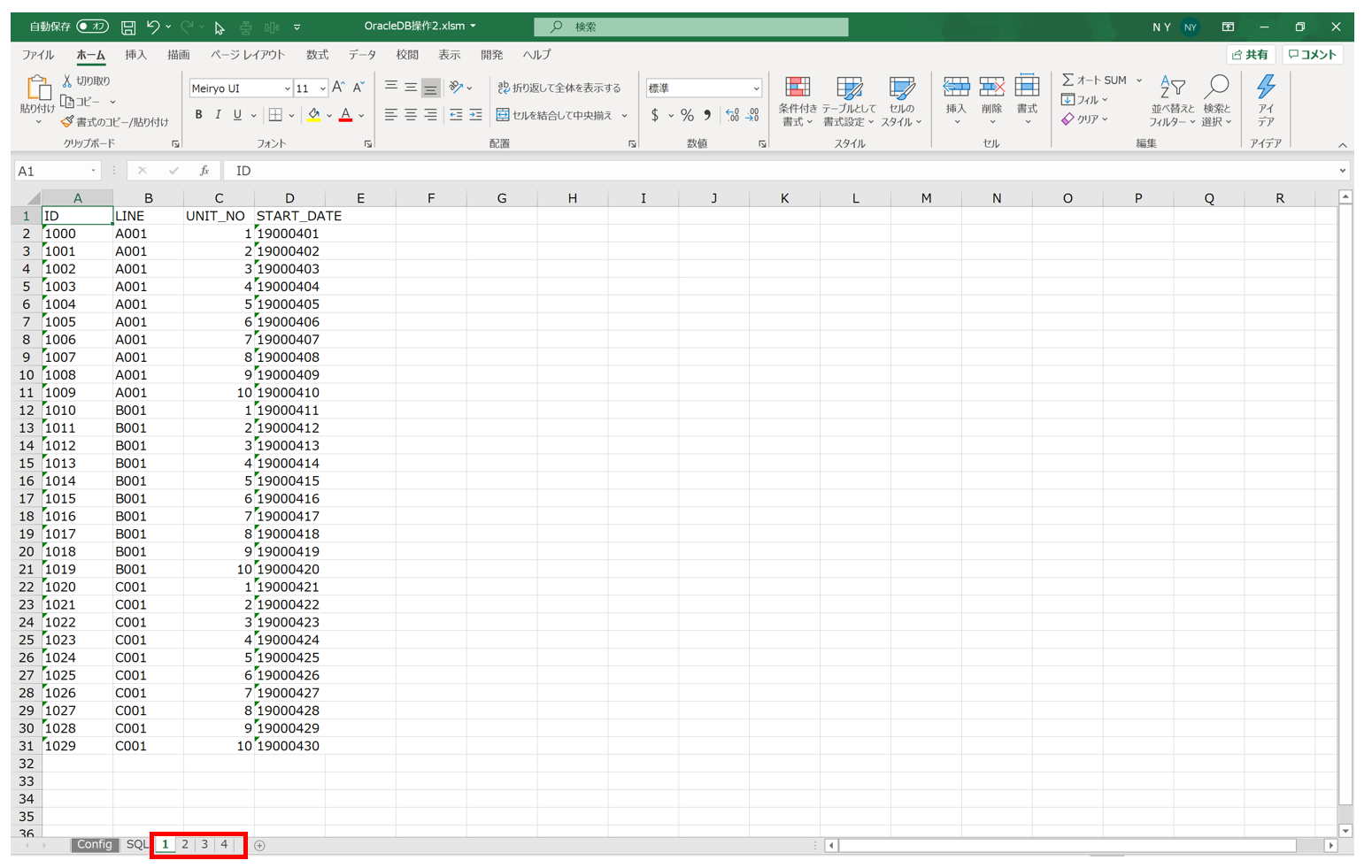
A sheet is created with the name entered in the "sheet name" field of the SQL sheet, and the SQL's extraction results are pasted into it.
Package Structure
The structure inside the Excel macro is as follows. (Only the modules used are listed.)
Template_ver1.x.x.xlsm
├標準モジュール
|   ├modCmnGlbConst
|   ├modSql
|
クラスモジュール
    ├Configurator
    ├DBManager
Source Code Explanation
This time, I'll skip the explanation of modCmnGlbConst and Configurator.
※Those are covered in Part 1 of DB operations.
①DBManager
This is the class that handles DB operations. It provides functionality for connecting to the Oracle DB and executing SQL.
I've excerpted the necessary variables and functions, with the explanation written as comments.
' ---- ---- ---- ---- ---- ---- ---- ---- ---- ---- ---- ---- ---- ---- ----
' DBManager クラス
' ---- ---- ---- ---- ---- ---- ---- ---- ---- ---- ---- ---- ---- ---- ----

Option Explicit

' ---- ---- ---- ---- ---- ---- ---- ---- ---- ---- ---- ---- ---- ---- ----
' 【使用手順 - SELECTによるデータ取得】
' ①インスタンス生成
' ②openOracle:オラクルへの接続 or openAccess:アクセスへの接続
' ③excuteSql:SQLの実行
' ④pasteRecordset:実行したSQLにより取得したデータを貼り付け
' ⑤closeRecordset:レコードセットのクローズ
' ⑥closeConnection:DB切断
' ---- ---- ---- ---- ---- ---- ---- ---- ---- ---- ---- ---- ---- ---- ----

' ---- ---- ---- ---- ---- ---- ---- ---- ---- ---- ---- ---- ---- ---- ----
' 【使用手順 - INSERT or UPDATE or DELETEの実行】
' ①インスタンス生成
' ②openOracle:オラクルへの接続 or openAccess:アクセスへの接続
' ③begintrans:トランザクション開始
' ④createAndExcuteOracleSql(s):SQLを生成して実行
' ⑤committrans:コミット ※エラー発生時 rollbacktrans
' ⑥closeConnection:DB切断
' ---- ---- ---- ---- ---- ---- ---- ---- ---- ---- ---- ---- ---- ---- ----

' メンバ変数(Me.で参照可能とするためpublic)
Public con As Object    ' Connection
Public rs As Object     ' Recordset

' ---- ---- ---- ---- ---- ---- ---- ---- ---- ---- ---- ---- ---- ---- ----
' brief : コンストラクタ
' note  :
' ---- ---- ---- ---- ---- ---- ---- ---- ---- ---- ---- ---- ---- ---- ----
Private Sub Class_Initialize()

    Set Me.con = CreateObject("Adodb.Connection")
    Set Me.rs = CreateObject("Adodb.Recordset")

End Sub

' ---- ---- ---- ---- ---- ---- ---- ---- ---- ---- ---- ---- ---- ---- ----
' brief : オラクルへの接続処理
' note  :
' ---- ---- ---- ---- ---- ---- ---- ---- ---- ---- ---- ---- ---- ---- ----
Public Sub openOracle(servicename As String, username As String, password As String)

    Dim constr As String

    constr = "DSN=" & servicename
    constr = constr & ";UID=" & username
    constr = constr & ";PWD=" & password

    Debug.Print (constr)
    Me.con.ConnectionString = constr
    Me.con.Open
    Debug.Print "オラクルへの接続完了"

End Sub

' ---- ---- ---- ---- ---- ---- ---- ---- ---- ---- ---- ---- ---- ---- ----
' brief : アクセスへの接続処理
' note  : 引数 access_name はフルパス(フォルダ名+ファイル名)
' ---- ---- ---- ---- ---- ---- ---- ---- ---- ---- ---- ---- ---- ---- ----
Public Sub openAccess(access_name As String)

    Me.con.Open "Provider=Microsoft.ACE.OLEDB.12.0;Data Source=" & access_name & ";" 'Accessファイルに接続
    Debug.Print "アクセスへの接続完了"

End Sub

' ---- ---- ---- ---- ---- ---- ---- ---- ---- ---- ---- ---- ---- ---- ----
' brief : トランザクション開始処理
' note  :
' ---- ---- ---- ---- ---- ---- ---- ---- ---- ---- ---- ---- ---- ---- ----
Public Sub begintrans()

    Me.con.begintrans
    Debug.Print "トランザクション開始"

End Sub

' ---- ---- ---- ---- ---- ---- ---- ---- ---- ---- ---- ---- ---- ---- ----
' brief : コミット処理
' note  :
' ---- ---- ---- ---- ---- ---- ---- ---- ---- ---- ---- ---- ---- ---- ----
Public Sub committrans()

    Me.con.committrans
    Debug.Print "コミット処理実施"

End Sub

' ---- ---- ---- ---- ---- ---- ---- ---- ---- ---- ---- ---- ---- ---- ----
' brief : ロールバック処理
' note  :
' ---- ---- ---- ---- ---- ---- ---- ---- ---- ---- ---- ---- ---- ---- ----
Public Sub rollbacktrans()

    Me.con.rollbacktrans
    Debug.Print "ロールバック処理実施"

End Sub

' ---- ---- ---- ---- ---- ---- ---- ---- ---- ---- ---- ---- ---- ---- ----
' brief : DB切断処理
' note  :
' ---- ---- ---- ---- ---- ---- ---- ---- ---- ---- ---- ---- ---- ---- ----
Public Sub closeConnection()

    On Error Resume Next

    Me.con.Close
    Me.rs.Close

    Set Me.con = Nothing
    Set Me.rs = Nothing

    On Error GoTo 0     ' エラー処理の命令取り消し
    Debug.Print "DBへの切断完了"

End Sub

' ---- ---- ---- ---- ---- ---- ---- ---- ---- ---- ---- ---- ---- ---- ----
' brief : レコードセットのクローズ
' note  : SQL実行でレコードセットにデータが格納された後はクローズ必要
'         (連続でSQLを実行してレコードセットをOpenすることはできない)
' ---- ---- ---- ---- ---- ---- ---- ---- ---- ---- ---- ---- ---- ---- ----
Public Sub closeRecordset()
    Me.rs.Close
End Sub

' ---- ---- ---- ---- ---- ---- ---- ---- ---- ---- ---- ---- ---- ---- ----
' brief : SQLの実行
' note  : SELECT文の実行後は、レコードセットにデータが格納される。
' ---- ---- ---- ---- ---- ---- ---- ---- ---- ---- ---- ---- ---- ---- ----
Public Sub excuteSql(str_sql As String)

    Debug.Print str_sql & " を実行します。"
    rs.Open str_sql, con

End Sub

' ---- ---- ---- ---- ---- ---- ---- ---- ---- ---- ---- ---- ---- ---- ----
' brief : 実行したSQLで取得したレコードセットをExcelに貼り付け
' note  : need_filed_ -> Trueでフィールド名も書き込み
' ---- ---- ---- ---- ---- ---- ---- ---- ---- ---- ---- ---- ---- ---- ----
Public Sub pasteRecordset(worksheet_ As Worksheet, data_start_row_ As Long, data_start_col_ As Long, need_filed_ As Boolean)

    Dim i As Long

    If need_filed_ = True Then

        'フィールド名の書き出し
        For i = 0 To rs.Fields.count - 1
            worksheet_.Cells(data_start_row_, data_start_col_ + i).Value = rs.Fields(i).Name
        Next i

        data_start_row_ = data_start_row_ + 1

    End If

    'CopyFromRecordsetメソッドで基準セルを指定してデータの書き出し
    worksheet_.Cells(data_start_row_, data_start_col_).CopyFromRecordset rs

End Sub
②modSql
This module uses the DBManager class to run SQL and paste the data into an Excel sheet.
Only the necessary variables and functions are excerpted; explanations are written as comments.
Option Explicit

    ' ---- SELECT文を実行する機能の設定項目
    Const SQL_SHEET_NAME = "SQL"
    Const DATA_SHEET_NAME_COL = 1
    Const SQL_COL = 2
    Const CONNECT_TYPE_COL = 3
    Const SQL_START_ROW = 2

    Dim config As Configurator
    Dim dbManagerOracle As dbManager
    Dim dbManagerAccess As dbManager

' ---- ---- ---- ---- ---- ---- ---- ---- ---- ---- ---- ---- ---- ---- ----
' brief : シートに登録されている各SELECT文を実行
' note  :
' ---- ---- ---- ---- ---- ---- ---- ---- ---- ---- ---- ---- ---- ---- ----
Public Sub executeSelects()

    Dim i As Long
    Dim row As Long

    Dim wsActive As Worksheet

    Dim servicename As String, username As String, password As String, accessPath As String

    Dim sqlSheet As Worksheet       ' データ取得するSQLが格納されているシート

    Dim dataSheetName As String     ' SQLのSELECTデータを貼り付けるシート名
    Dim sql As String               ' SQL(SELECT文)
    Dim connectType As String       ' 接続タイプ(Oracle or Access)

    Set dbManagerOracle = Nothing
    Set dbManagerAccess = Nothing

    focus True

    ' 実行時のシートを保存
    Set wsActive = ActiveSheet

    ' Config 設定の読み込み
    Set config = New Configurator
    config.setData ThisWorkbook.Worksheets(GLB_CONFIG_SHEET), GLB_CONFIG_KEY_COL, GLB_CONFIG_ITEM_COL, GLB_CONFIG_START_ROW

    servicename = config.getItem("SERVICE_NAME")
    username = config.getItem("USERNAME")
    password = config.getItem("PASSWORD")
    accessPath = config.getItem("ACCESS_PATH")

    i = 0

    dataSheetName = ThisWorkbook.Worksheets(SQL_SHEET_NAME).Cells(SQL_START_ROW + i, DATA_SHEET_NAME_COL)
    sql = ThisWorkbook.Worksheets(SQL_SHEET_NAME).Cells(SQL_START_ROW + i, SQL_COL)
    connectType = ThisWorkbook.Worksheets(SQL_SHEET_NAME).Cells(SQL_START_ROW + i, CONNECT_TYPE_COL)

    ' シートに登録されている各SELECT文を実行(シート名が無くなるまで繰り返し)
    Do While dataSheetName <> ""

        ' データ貼り付け先のシートを削除
        If sheetExists(ThisWorkbook, dataSheetName) Then
            Application.DisplayAlerts = False ' メッセージを非表示
            ThisWorkbook.Worksheets(dataSheetName).Delete
            Application.DisplayAlerts = True  ' メッセージを表示
        End If

        ' データ貼り付け先のシートを作成
        If sql <> "" Then
            ' SQL 有り → シート作成
            createSheet ThisWorkbook, dataSheetName

        End If

        ' - Oracle 接続
        If connectType = "Oracle" Then

            ' DB接続
            If (sql <> "") And (dbManagerOracle Is Nothing) Then
                Set dbManagerOracle = New dbManager
                dbManagerOracle.openOracle servicename, username, password
            End If

            ' SQLを実行
            dbManagerOracle.excuteSql sql

            ' シートにSQLで取得したデータを貼り付け
            dbManagerOracle.pasteRecordset ThisWorkbook.Worksheets(dataSheetName), 1, 1, True

            ' レコードセットをクローズ
            dbManagerOracle.closeRecordset

        ' - Access 接続
        ElseIf connectType = "Access" Then

            ' DB接続
            If (sql <> "") And (dbManagerAccess Is Nothing) Then
                Set dbManagerAccess = New dbManager
                dbManagerAccess.openAccess accessPath
            End If

            ' SQLを実行
            dbManagerAccess.excuteSql sql

            ' シートにSQLで取得したデータを貼り付け
            dbManagerAccess.pasteRecordset ThisWorkbook.Worksheets(dataSheetName), 1, 1, True

            ' レコードセットをクローズ
            dbManagerAccess.closeRecordset

        Else
            ' SQLが記載かつ接続タイプが設定されていない場合は終了
            If sql <> "" Then
                MsgBox SQL_SHEET_NAME & " シートの接続タイプが正しく設定されていません。終了します。"
                ThisWorkbook.Worksheets(SQL_SHEET_NAME).Activate
                End
            End If
        End If

        i = i + 1
        dataSheetName = ThisWorkbook.Worksheets(SQL_SHEET_NAME).Cells(SQL_START_ROW + i, DATA_SHEET_NAME_COL)
        sql = ThisWorkbook.Worksheets(SQL_SHEET_NAME).Cells(SQL_START_ROW + i, SQL_COL)
        connectType = ThisWorkbook.Worksheets(SQL_SHEET_NAME).Cells(SQL_START_ROW + i, CONNECT_TYPE_COL)

    Loop

    ' - Oracle切断
    If Not dbManagerOracle Is Nothing Then
        dbManagerOracle.closeConnection
    End If

    ' - Access切断
    If Not dbManagerAccess Is Nothing Then
        dbManagerAccess.closeConnection
    End If

    wsActive.Activate
    focus False

    Application.StatusBar = Now & "SQL SELECT実行完了"

End Sub
That's it for this part.
Using this feature, you can extract the latest data from the DB with a single button click.
For example, it can help make data aggregation work more efficient.
Next time, I'll explain how to INSERT, UPDATE, and DELETE data in the Oracle DB based on data entered in Excel sheets.
Related plants
More Tech articles →VBA | DB Operations – Part 4: Running MERGE from Excel
Excel macro Part 4: [Running MERGE from Excel]
#excel-vba#oracle#sqlVBA | DB Operations - Part 3: Running INSERT, UPDATE, DELETE from Excel
Excel macro Part 3: [Running INSERT, UPDATE, DELETE from Excel]
#excel-vba#oracle#sqlExcel VBA Template File (Improved mk2)
I created an Excel VBA template file. Built mainly around class modules, it implements CRUD operations against a database (Oracle) linked to an Excel table.
#excel-vba#oracle