VBA | DB Operations - Part 3: Running INSERT, UPDATE, DELETE from Excel
Excel macro Part 3: [Running INSERT, UPDATE, DELETE from Excel]
Let's continue explaining the Excel macro for working with a DB.
This article is "Part 3."
Part 1: Handling the Config sheet's settings in VBA
Part 2: Storing SELECT results in Excel
Part 3: Running INSERT, UPDATE, DELETE from Excel
Part 4: Running MERGE from Excel
【Download the Excel file here】
※Revised 2021/2/5
・Switched from ODBC to OraOLEDB.Oracle for the connection
・Fixed how INSERT, UPDATE, and MERGE statements are generated
Overview
Part 3 explains how to insert, update, and delete data (cell values) stored in an Excel sheet into a table in a specified DB (database).
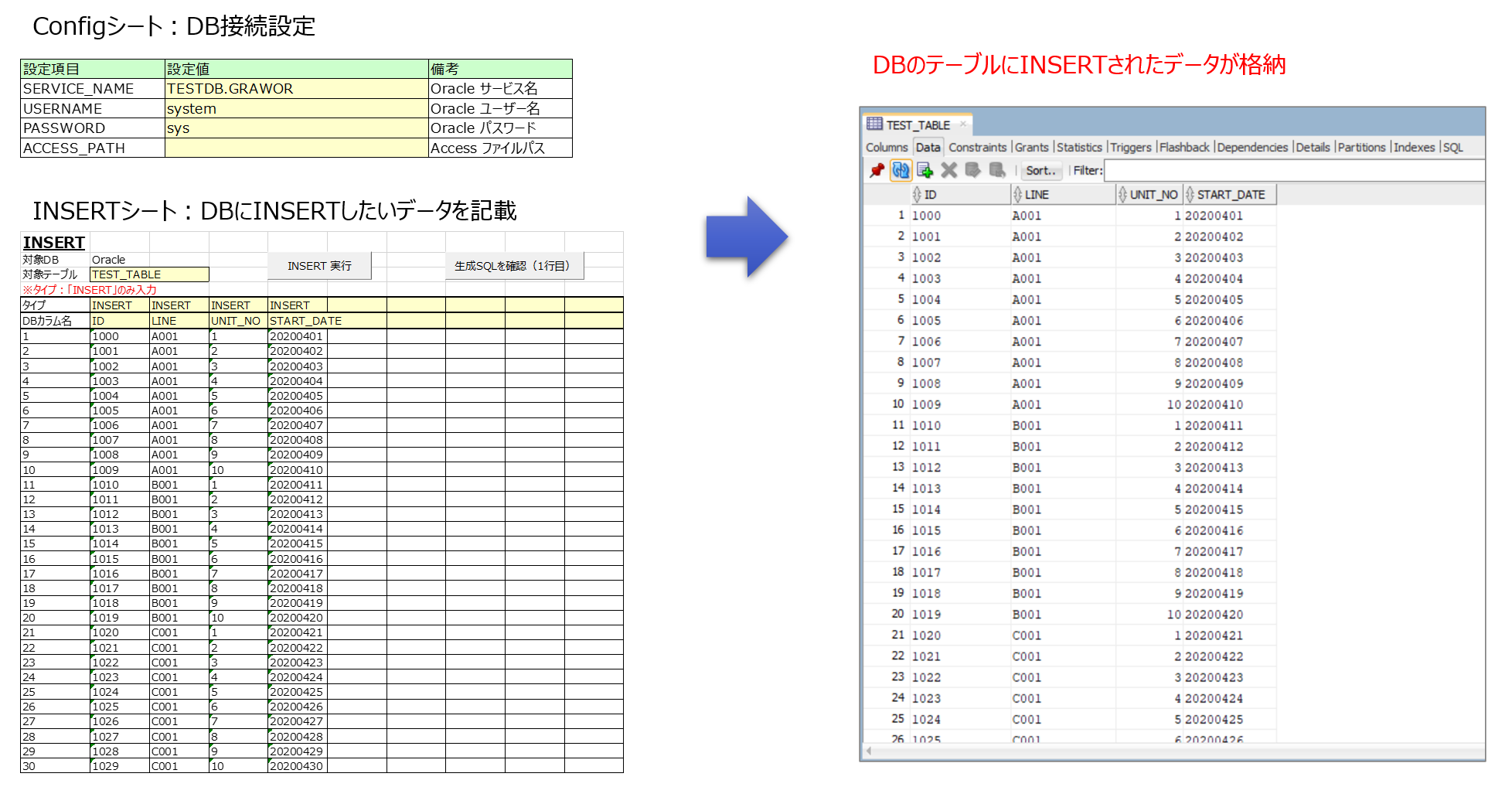
You configure the DB connection details in Excel's "Config sheet," and operate the database from the "INSERT," "UPDATE," and "DELETE" sheets.
| Type | Function |
|---|---|
| INSERT | Insert data into a DB table (record insertion) |
| UPDATE | Update data stored in a DB table (record update) |
| DELETE | Delete data stored in a DB table (record deletion) |
The steps are shown below.
①DB connection settings
Write the DB connection settings in the Config sheet. (Only Oracle is supported as the DB.)
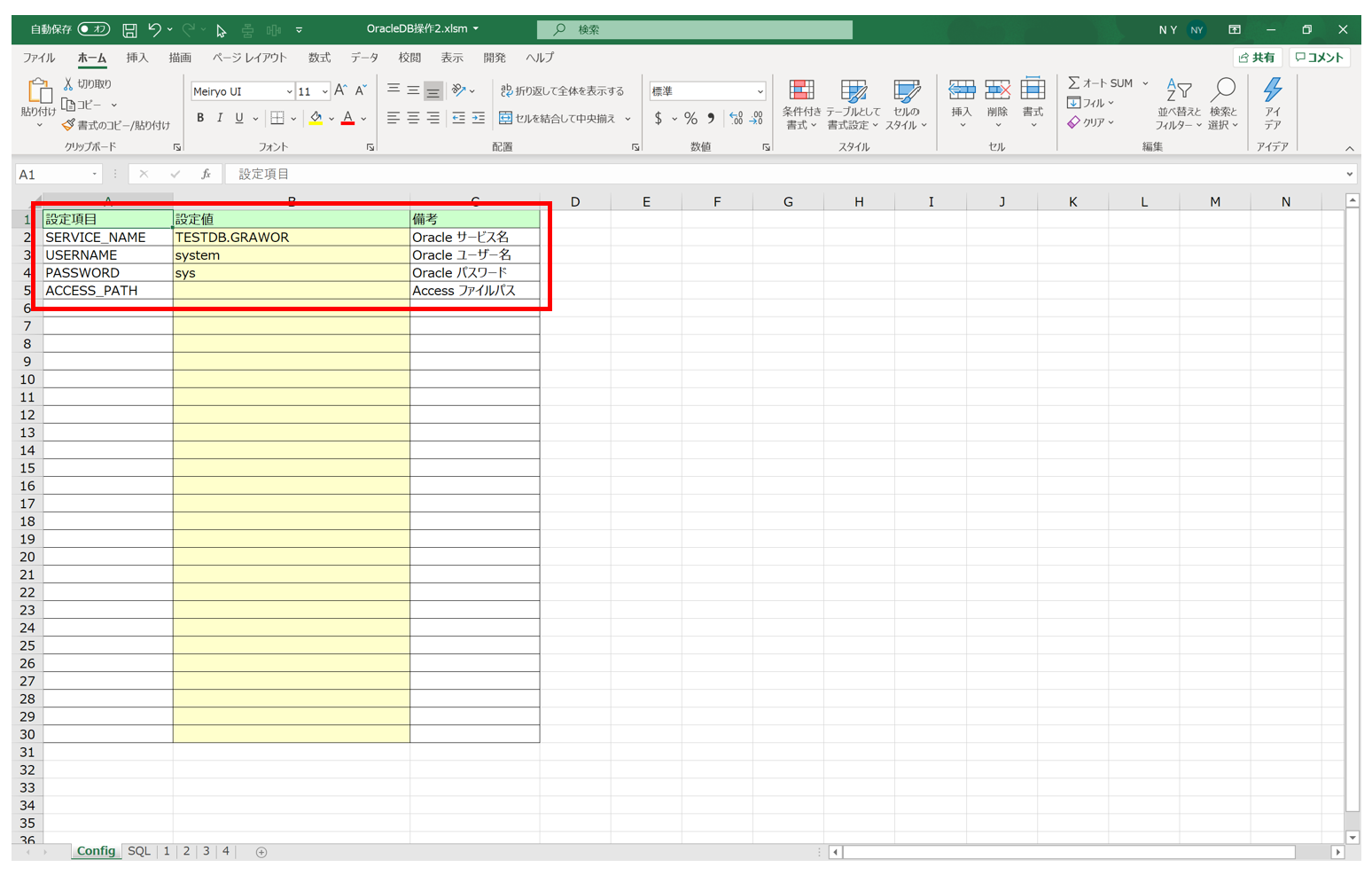
The SERVICE_NAME (service name) is written in the tnsnames.ora file created and configured when installing the Oracle client or server.
Example: In the tnsnames.ora example below, TESTDB.GRAWOR is the service name.
TESTDB =
  (DESCRIPTION =
    (ADDRESS = (PROTOCOL = TCP)(HOST = ***)(PORT = 1521))
    (CONNECT_DATA =
      (SERVER = DEDICATED)
      (SERVICE_NAME = TESTDB.GRAWOR)
    )
  )
②Checking the generated INSERT statement
Here's how to proceed when inserting data into the DB.
First, enter the data you want to store on the INSERT sheet and check the generated INSERT statement.
Here's how to set up the data to be inserted:
- Specify the target table. (e.g. TEST_TABLE)
- Specify the columns to be stored in the target table by type and DB column name.
(e.g. INSERT・ID, INSERT・LINE ・・・INSERT・START_DATE) - Enter the data to be inserted for each specified column.
(e.g. 1000, A001, 1, 20200401, etc.)
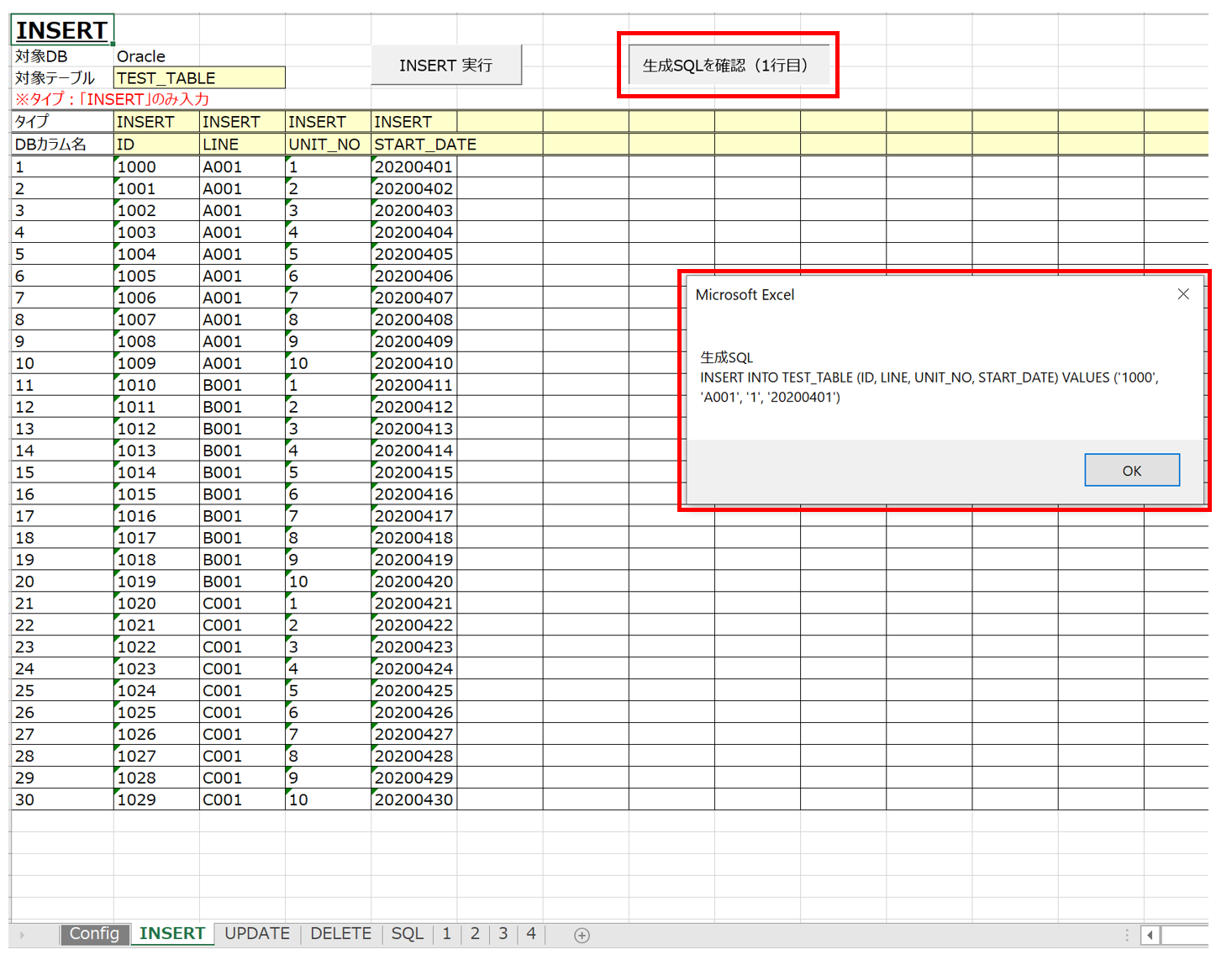
If everything looks correct, move on to running the INSERT statement.
③Running the INSERT statement
Clicking the Run INSERT button starts the process of inserting the data written on the INSERT sheet into the target DB table.
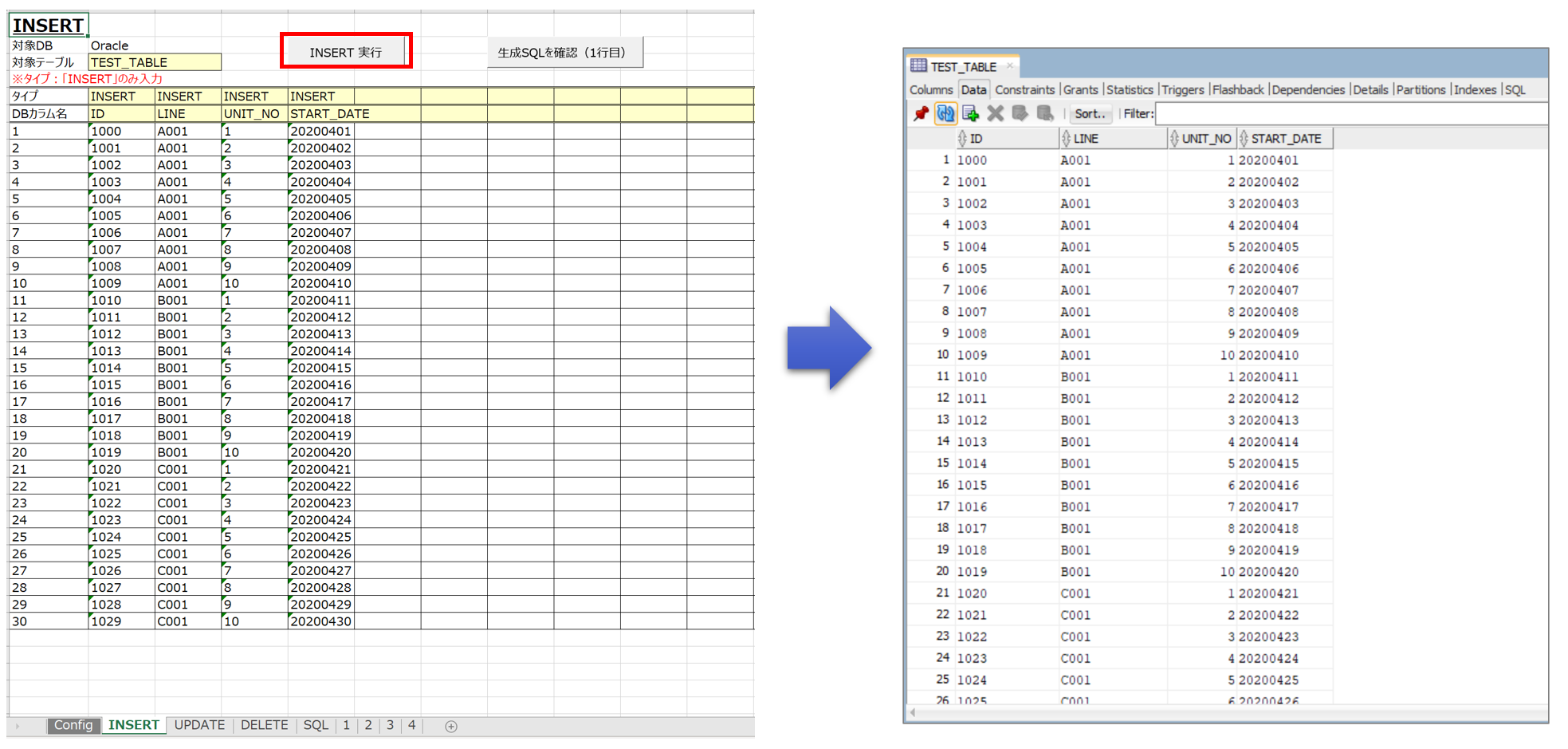
In the example above, running INSERT stored the data in the DB's "TEST_TABLE."
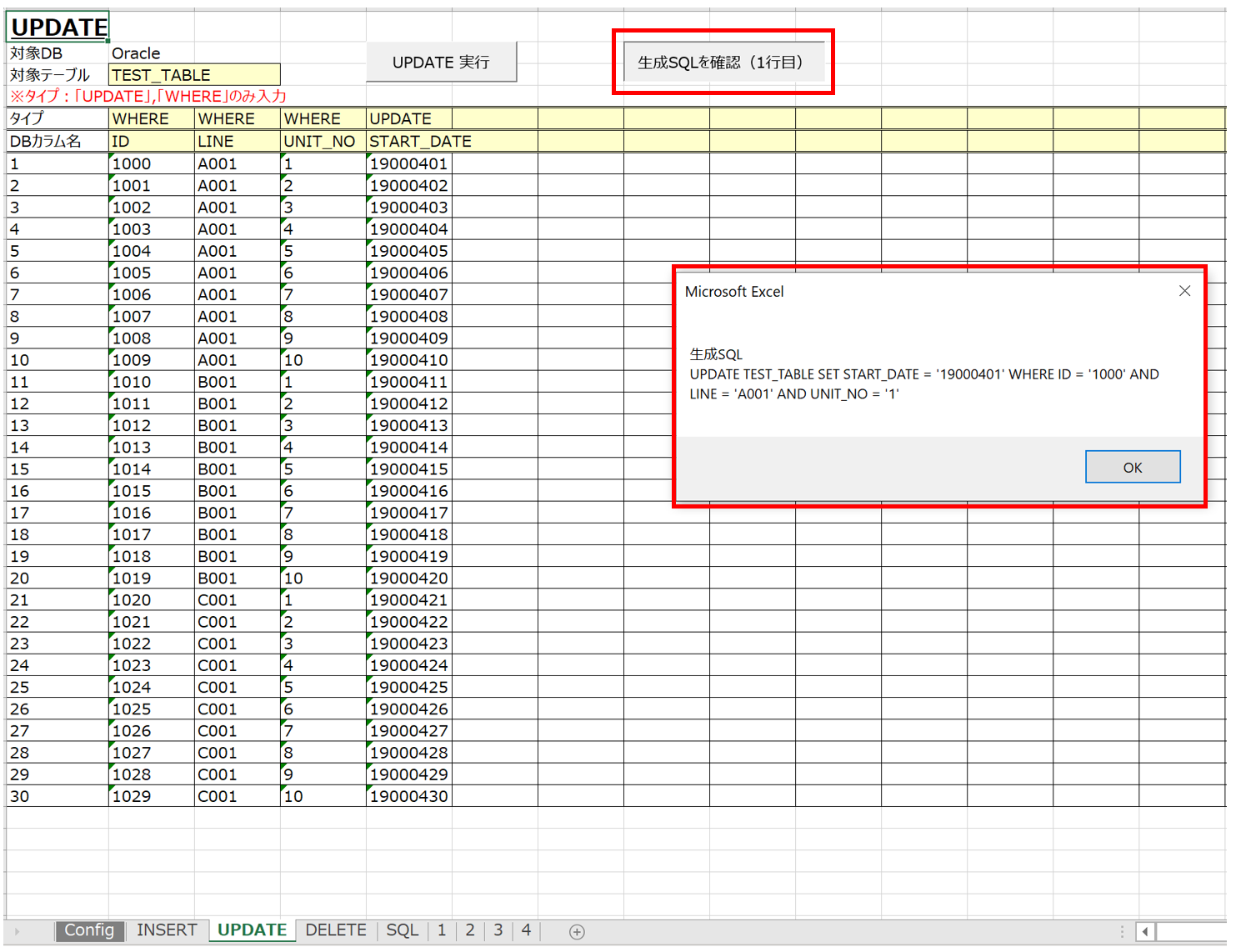
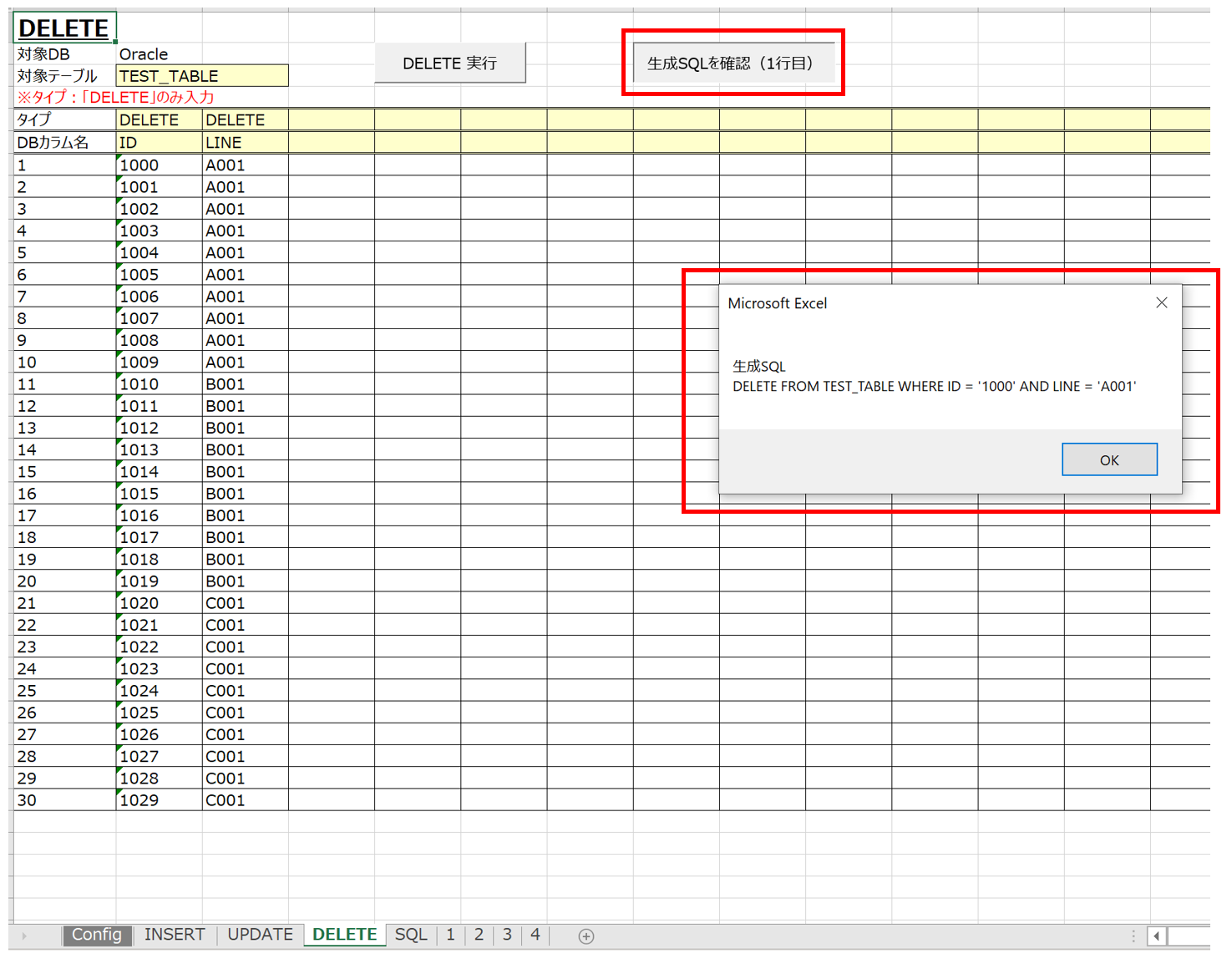
④UPDATE and DELETE statements
So far I've explained running the INSERT statement, but UPDATE and DELETE statements are also supported.
The steps for running UPDATE and DELETE statements are roughly the same as for INSERT. Refer to the images below and give it a try.
Package Structure
The structure inside the Excel macro is as follows. (Only the modules used are listed.)
Template_ver1.x.x.xlsm
├標準モジュール
|   ├modCmnGlbConst
|   ├modSql
|
クラスモジュール
    ├Configurator
    ├DBManager
Source Code Explanation
This time, I'll skip the explanation of modCmnGlbConst and Configurator.
※Those are covered in Part 1 of DB operations.
①Standard module: modSql
Taking the INSERT sheet as an example, clicking the Run INSERT button executes the executeInsertSqlsOracle() function (below).
This function instantiates the DBManager class, then calls a function on that instance to generate and execute the INSERT statement.
' ---- ---- ---- ---- ---- ---- ---- ---- ---- ---- ---- ---- ---- ---- ----
' brief : A.各INSERT文を連続実行
' note  : Oracle対応
' ---- ---- ---- ---- ---- ---- ---- ---- ---- ---- ---- ---- ---- ---- ----
Public Sub executeInsertSqlsOracle()

    Dim servicename As String, username As String, password As String

    Dim sheet As Worksheet          ' SQLを生成する情報が格納されているシート
    Dim tableName As String         ' 操作する対象のテーブル

    ' Config 設定の読み込み
    Set config = New Configurator
    config.setData ThisWorkbook.Worksheets(GLB_CONFIG_SHEET), GLB_CONFIG_KEY_COL, GLB_CONFIG_ITEM_COL, GLB_CONFIG_START_ROW

    servicename = config.getItem("SERVICE_NAME")
    username = config.getItem("USERNAME")
    password = config.getItem("PASSWORD")

    ' DB接続
    Set dbManagerOracle = New DBManager
    dbManagerOracle.openOracle servicename, username, password

    Set sheet = ThisWorkbook.Worksheets(INSERT_SHEET_NAME)
    tableName = sheet.Cells(TABLE_NAME_ROW, TABLE_NAME_COL)

    ' トランザクション開始
    dbManagerOracle.begintrans

    On Error GoTo err

    ' SQL実行
    dbManagerOracle.createAndExcuteOracleSqls tableName, sheet, TYPE_DIFINED_ROW, DB_COL_NAME_DIFINED_ROW, DATA_START_ROW, DATA_START_COL

    ' コミット
    dbManagerOracle.committrans

    ' DB切断
    dbManagerOracle.closeConnection

    Application.StatusBar = Now & "SQL INSERT実行完了"

    Exit Sub

err:
    ' エラー発生時はロールバック
    Debug.Print "エラー番号:" & err.Number & Chr(13) & "エラー内容:" & err.Description
    MsgBox "エラー番号:" & err.Number & Chr(13) & "エラー内容:" & err.Description

    MsgBox "ロールバックを実行し、プログラムを終了します。"
    dbManagerOracle.rollbacktrans

    End

End Sub
The steps for generating and executing UPDATE and DELETE statements are the same as those for INSERT above, so I'll skip the explanation. See the VBA in the Excel macro for the details.
②Class module: DBManager
DBManager also provides functionality for connecting to the Oracle DB.
That's covered in DB operations - Part 2, so I'll skip the explanation here.
This time, I'll explain the part of the source code that generates and executes an INSERT statement by operating DBManager from a function in (1) standard module: modSql.
The following functions are called in sequence to generate and execute the SQL statement:
createAndExcuteOracleSqls (executes all records)
↓
createAndExcuteOracleSql (executes one record)
↓
createOracleSql (generates the SQL statement)
checkSqlType (determines whether it's INSERT, UPDATE, or DELETE)
├ ->createInsertOracleSql (generates the INSERT statement)
├ ->createUpdateOracleSql (generates the UPDATE statement)
└ ->createDeleteOracleSql (generates the DELETE statement)
' ---- ---- ---- ---- ---- ---- ---- ---- ---- ---- ---- ---- ---- ---- ----
' brief : INSERT or UPDATE or DELETE SQL文を作成して実行(1行)
' note  : 引数
'         テーブル名、ワークシート、SQLタイプ指定行、データベースカラム名指定行
'         データ格納開始行、データ格納開始列
' ---- ---- ---- ---- ---- ---- ---- ---- ---- ---- ---- ---- ---- ---- ----
Public Sub createAndExcuteOracleSql(table_name As String, sheet As Worksheet, sql_type_defined_row As Long, db_col_name_defined_row As Long _
    , db_data_start_row As Long, db_data_start_col As Long)

    Dim sql As String

    ' SQL作成
    sql = createOracleSql(table_name, sheet, sql_type_defined_row, db_col_name_defined_row, db_data_start_row, db_data_start_col)

    ' SQL実行
    excuteSql sql

End Sub

' ---- ---- ---- ---- ---- ---- ---- ---- ---- ---- ---- ---- ---- ---- ----
' brief : INSERT or UPDATE or DELETE SQL文を作成して実行(複数行)
' note  : 引数
'         テーブル名、ワークシート、SQLタイプ指定行、データベースカラム名指定行
'         データ格納開始行、データ格納開始列
' ---- ---- ---- ---- ---- ---- ---- ---- ---- ---- ---- ---- ---- ---- ----
Public Sub createAndExcuteOracleSqls(table_name As String, sheet As Worksheet, sql_type_defined_row As Long, db_col_name_defined_row As Long _
    , db_data_start_row As Long, db_data_start_col As Long)

    Dim i As Long
    Dim sql As String
    Dim val
    Dim db_data_end_row As Long

    ' データの最終行を検索
    i = 1
    Do While sheet.Cells(db_data_start_row + i, db_data_start_col) <> ""
        i = i + 1
    Loop

    db_data_end_row = db_data_start_row + i - 1

    For i = db_data_start_row To db_data_end_row

        createAndExcuteOracleSql table_name, sheet, sql_type_defined_row, db_col_name_defined_row, i, db_data_start_col

    Next

End Sub

' ---- ---- ---- ---- ---- ---- ---- ---- ---- ---- ---- ---- ---- ---- ----
' brief : INSERT or UPDATE or DELETE SQL文を作成
' note  : 引数
'         テーブル名、ワークシート、SQLタイプ指定行、データベースカラム名指定行
'         データ格納開始行、データ格納開始列
' ---- ---- ---- ---- ---- ---- ---- ---- ---- ---- ---- ---- ---- ---- ----
Public Function createOracleSql(table_name As String, sheet As Worksheet, sql_type_defined_row As Long, db_col_name_defined_row As Long _
    , db_data_start_row As Long, db_data_start_col As Long) As String

    Dim sql As String
    sql = ""

    Select Case checkSqlType(sheet, sql_type_defined_row, db_data_start_col)

        Case "INSERT"
            sql = createInsertOracleSql(table_name, sheet, sql_type_defined_row, db_col_name_defined_row, db_data_start_row, db_data_start_col)
            createOracleSql = sql
            Exit Function

        Case "UPDATE"
            sql = createUpdateOracleSql(table_name, sheet, sql_type_defined_row, db_col_name_defined_row, db_data_start_row, db_data_start_col)
            createOracleSql = sql
            Exit Function

        Case "DELETE"
            sql = createDeleteOracleSql(table_name, sheet, sql_type_defined_row, db_col_name_defined_row, db_data_start_row, db_data_start_col)
            createOracleSql = sql
            Exit Function

    End Select

    createOracleSql = sql

End Function

' ---- ---- ---- ---- ---- ---- ---- ---- ---- ---- ---- ---- ---- ---- ----
' brief : Excelから作成するSQLタイプがINSERT,UPDATE,DELTEのどれかなのか確認
' note  :
' ---- ---- ---- ---- ---- ---- ---- ---- ---- ---- ---- ---- ---- ---- ----
Private Function checkSqlType(sheet As Worksheet, type_start_row As Long, type_start_col As Long) As String

    Dim start_col As Long, end_col As Long

    Dim i As Long

    checkSqlType = ""

    start_col = type_start_col
    end_col = getMaxColRight(sheet, type_start_row, type_start_col)

    For i = start_col To end_col
        Select Case sheet.Cells(type_start_row, i)

            Case "INSERT"
                checkSqlType = "INSERT"
                Exit Function

            Case "UPDATE"
                checkSqlType = "UPDATE"
                Exit Function

            Case "DELETE"
                checkSqlType = "DELETE"
                Exit Function

        End Select
    Next

    MsgBox "DBManager.checkSqlType:SQLタイプの設定が間違っています。INSERT,UPDATE,DELETEが含まれていません。"
    End

End Function

' ---- ---- ---- ---- ---- ---- ---- ---- ---- ---- ---- ---- ---- ---- ----
' brief : INSERT SQL文を作成
' note  : 引数
'         テーブル名、ワークシート、SQLタイプ指定行、データベースカラム名指定行
'         データ格納開始行、データ格納開始列
' ---- ---- ---- ---- ---- ---- ---- ---- ---- ---- ---- ---- ---- ---- ----
Private Function createInsertOracleSql(table_name As String, sheet As Worksheet, sql_type_defined_row As Long, db_col_name_defined_row As Long _
    , db_data_start_row As Long, db_data_start_col As Long) As String

    Dim i As Long, j As Long
    Dim start_row As Long, start_col As Long, end_col As Long

    Dim sqltype As String
    Dim sql As String, sql_1 As String, sql_2 As String

    start_row = db_data_start_row
    start_col = db_data_start_col
    end_col = getMaxColRight(sheet, start_row, start_col)

    sqltype = sheet.Cells(sql_type_defined_row, start_col).Value

    i = start_row

    ' INSERT文の生成
    sql = ""
    sql_1 = "INSERT INTO " & table_name & " ("
    sql_2 = "VALUES ("

    For j = start_col To end_col

        ' DBカラム名を追加
        sql_1 = sql_1 & sheet.Cells(db_col_name_defined_row, j).Value
        If j <> end_col Then
            sql_1 = sql_1 & ", "
        Else
            sql_1 = sql_1 & ") "
        End If

        ' DBカラム名に対する値を追加
        sql_2 = sql_2 & "'" & sheet.Cells(i, j).Value & "'"
        If j <> end_col Then
            sql_2 = sql_2 & ", "
        Else
            sql_2 = sql_2 & ") "
        End If

    Next

    sql = sql_1 + sql_2

    sql = Replace(sql_1 + sql_2, ", WHERE", " WHERE")
    If Right(sql, 1) = "," Then sql = Mid(sql, 1, Len(sql) - 1)
    If Right(sql, 5) = " AND " Then sql = Mid(sql, 1, Len(sql) - 5)

    createInsertOracleSql = sql

End Function

' ---- ---- ---- ---- ---- ---- ---- ---- ---- ---- ---- ---- ---- ---- ----
' brief : UPDATE SQL文を作成
' note  : 引数
'         テーブル名、ワークシート、SQLタイプ指定行、データベースカラム名指定行
'         データ格納開始行、データ格納開始列
' ---- ---- ---- ---- ---- ---- ---- ---- ---- ---- ---- ---- ---- ---- ----
Private Function createUpdateOracleSql(table_name As String, sheet As Worksheet, sql_type_defined_row As Long, db_col_name_defined_row As Long _
    , db_data_start_row As Long, db_data_start_col As Long) As String

    Dim i As Long, j As Long
    Dim start_row As Long, start_col As Long, end_col As Long

    Dim sqltype As String
    Dim sql As String, sql_1 As String, sql_2 As String

    start_row = db_data_start_row
    start_col = db_data_start_col
    end_col = getMaxColRight(sheet, start_row, start_col)

    sqltype = sheet.Cells(sql_type_defined_row, start_col).Value

    i = start_row

    ' UPDATE文の生成
    sql = ""
    sql_1 = "UPDATE " & table_name & " SET "
    sql_2 = "WHERE "

    For j = start_col To end_col

        If sheet.Cells(sql_type_defined_row, j).Value = "UPDATE" Then

            ' UPDATEするDBカラム名と値を追加
            sql_1 = sql_1 & sheet.Cells(db_col_name_defined_row, j).Value & " = '" _
                 & sheet.Cells(i, j).Value & "'"
            If j <> end_col Then
                sql_1 = sql_1 & ", "
            Else
                sql_1 = sql_1 & " "
            End If

        ElseIf sheet.Cells(sql_type_defined_row, j).Value = "WHERE" Then

            ' WHEREに対するDBカラム名と値を追加
            sql_2 = sql_2 & sheet.Cells(db_col_name_defined_row, j).Value & " = '" _
                 & sheet.Cells(i, j).Value & "'"
            If j <> end_col Then
                sql_2 = sql_2 & " AND "
            Else
                sql_2 = sql_2 & " "
            End If

        Else
            Debug.Print ("UPDATE文に対して、SQLタイプ設定が正しくありません。設定を見直して下さい。")
            Exit Function
        End If
    Next

    sql = sql_1 + sql_2

    sql = Replace(sql_1 + sql_2, ", WHERE", " WHERE")
    If Right(sql, 1) = "," Then sql = Mid(sql, 1, Len(sql) - 1)
    If Right(sql, 5) = " AND " Then sql = Mid(sql, 1, Len(sql) - 5)

    createUpdateOracleSql = sql

End Function

' ---- ---- ---- ---- ---- ---- ---- ---- ---- ---- ---- ---- ---- ---- ----
' brief : DELETE SQL文を作成
' note  : 引数
'         テーブル名、ワークシート、SQLタイプ指定行、データベースカラム名指定行
'         データ格納開始行、データ格納開始列
' ---- ---- ---- ---- ---- ---- ---- ---- ---- ---- ---- ---- ---- ---- ----
Private Function createDeleteOracleSql(table_name As String, sheet As Worksheet, sql_type_defined_row As Long, db_col_name_defined_row As Long _
    , db_data_start_row As Long, db_data_start_col As Long) As String

    Dim i As Long, j As Long
    Dim start_row As Long, start_col As Long, end_col As Long

    Dim sqltype As String
    Dim sql As String, sql_1 As String, sql_2 As String

    start_row = db_data_start_row
    start_col = db_data_start_col
    end_col = getMaxColRight(sheet, start_row, start_col)

    sqltype = sheet.Cells(sql_type_defined_row, start_col).Value

    i = start_row

    ' DELETE文の生成
    sql = ""
    sql_1 = "DELETE FROM " & table_name & " "
    sql_2 = "WHERE "

    For j = start_col To end_col

        If sheet.Cells(sql_type_defined_row, j).Value = "DELETE" Then

            ' WHEREに対するDBカラム名と値を追加
            sql_2 = sql_2 & sheet.Cells(db_col_name_defined_row, j).Value & " = '" _
                 & sheet.Cells(i, j).Value & "'"
            If j <> end_col Then
                sql_2 = sql_2 & " AND "
            Else
                sql_2 = sql_2 & " "
            End If

        Else
            Debug.Print ("DELETE文に対して、SQLタイプ設定が正しくありません。設定を見直して下さい。")
            Exit Function
        End If
    Next

    sql = sql_1 + sql_2

    sql = Replace(sql_1 + sql_2, ", WHERE", " WHERE")
    If Right(sql, 1) = "," Then sql = Mid(sql, 1, Len(sql) - 1)
    If Right(sql, 5) = " AND " Then sql = Mid(sql, 1, Len(sql) - 5)

    createDeleteOracleSql = sql

End Function
That's it for this part.
The feature explained this time makes it possible, for example, to enter forms and other business documents in Excel and store the entered data in a database.
Next time, I'd like to add a feature that runs a MERGE statement to choose between INSERT and UPDATE depending on the data already stored in the database.
Once the MERGE statement generation feature from next time is in place, this could be used as an Excel platform for operating an Oracle database.
Related plants
More Tech articles →VBA | DB Operations – Part 4: Running MERGE from Excel
Excel macro Part 4: [Running MERGE from Excel]
#excel-vba#oracle#sqlVBA | DB Operations - Part 2: Storing SELECT Results in Excel
Excel macro Part 2: [Storing SELECT results in Excel]
#excel-vba#oracle#sqlExcel VBA Template File (Improved mk2)
I created an Excel VBA template file. Built mainly around class modules, it implements CRUD operations against a database (Oracle) linked to an Excel table.
#excel-vba#oracle