VBA | DB Operations - Part 1: Handling the Config Sheet's Settings in VBA
Excel macro Part 1: [Handling the Config sheet's settings in VBA]
I built an Excel macro for working with a DB.
Since this macro covers a lot of ground, I'll explain it across 4 parts.
Part 1: Handling the Config sheet's settings in VBA
Part 2: Storing SELECT results in Excel
Part 3: Running INSERT, UPDATE, DELETE from Excel
Part 4: Running MERGE from Excel
【Download the Excel file here】
※Revised 2021/2/5
・Switched from ODBC to OraOLEDB.Oracle for the connection
・Fixed how INSERT, UPDATE, and MERGE statements are generated
Overview
Part 1 explains how to work with the settings used for DB operations in VBA (macro development).
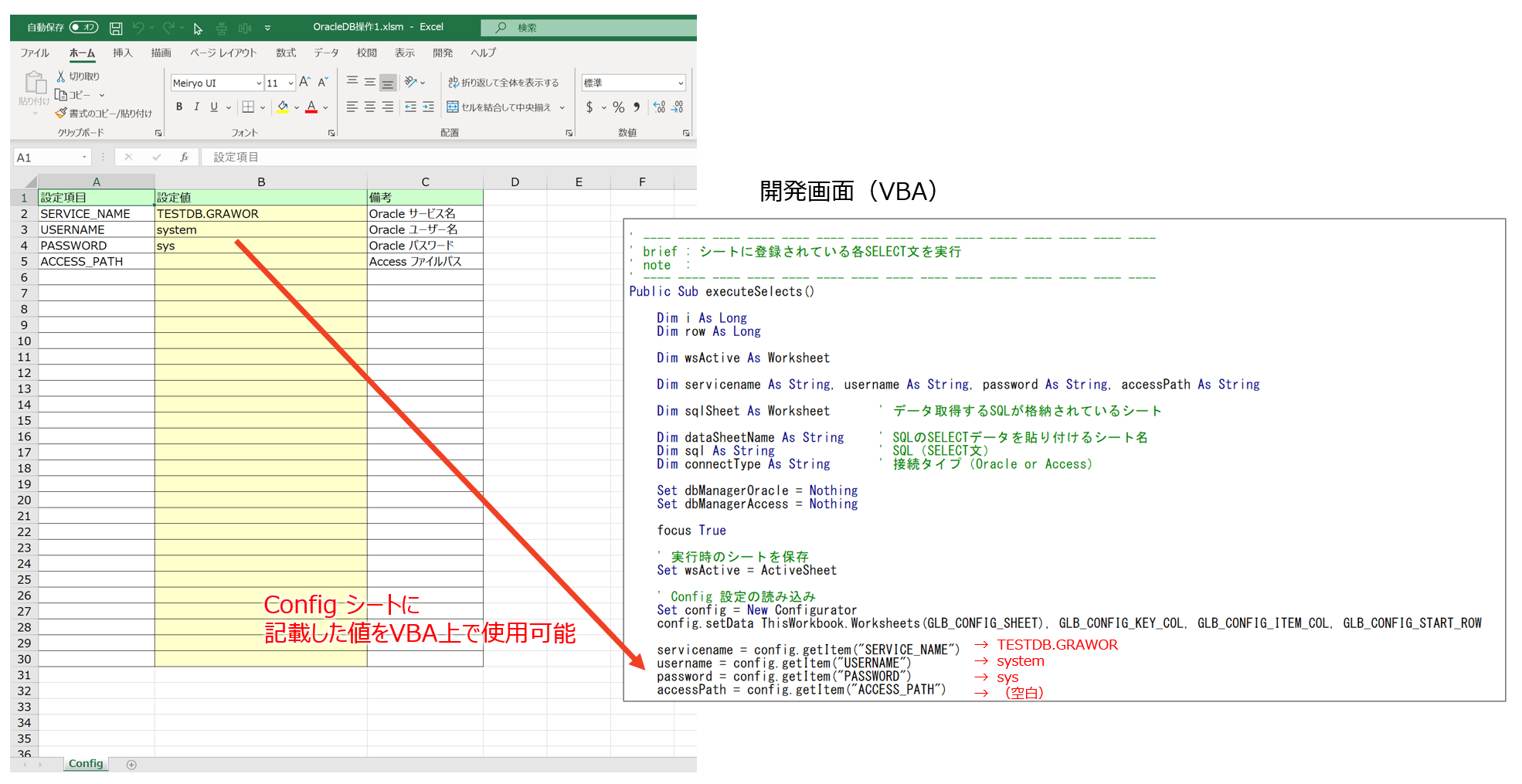
The three settings needed for the Oracle connection — "service name," "username," and "password" — are configured in the Config sheet.
With the Configurator class explained here, you can easily add configuration values.
(Think of it as bringing an ini file into Excel.)
Package Structure
The structure inside the Excel macro is as follows.
(Only the modules used are listed below.)
Template_ver1.x.x.xlsm
├標準モジュール
|   ├modCmnGlbConst
|
|
クラスモジュール
    ├Configurator
Source Code Explanation
①modCmnGlbConst
To extract configuration values from the Excel sheet, this defines the "sheet, row, and column" where the Config information is written.
Option Explicit

' Config 設定シート情報
Public Const GLB_CONFIG_SHEET = "Config"
Public Const GLB_CONFIG_KEY_COL = 1
Public Const GLB_CONFIG_ITEM_COL = 2
Public Const GLB_CONFIG_START_ROW = 2
For example, if you want to use a sheet name other than "Config," change the constant GLB_CONFIG_SHEET above.
②Configurator
This is the class responsible for extracting the Config information.
The explanation is written as comments.
' ---- ---- ---- ---- ---- ---- ---- ---- ---- ---- ---- ---- ---- ---- ----
' Configurator クラス
' ---- ---- ---- ---- ---- ---- ---- ---- ---- ---- ---- ---- ---- ---- ----

Option Explicit

' ---- ---- ---- ---- ---- ---- ---- ---- ---- ---- ---- ---- ---- ---- ----
' 【使用手順】
' ① インスタンス生成
' ② setData    :設定値を格納
' ③ getItem    :設定値を取得
' ---- ---- ---- ---- ---- ---- ---- ---- ---- ---- ---- ---- ---- ---- ----

' メンバ変数(Me.で参照可能とするためpublic)
Public dic As Object

' ---- ---- ---- ---- ---- ---- ---- ---- ---- ---- ---- ---- ---- ---- ----
' brief : コンストラクタ
' note  :
' ---- ---- ---- ---- ---- ---- ---- ---- ---- ---- ---- ---- ---- ---- ----
Private Sub Class_Initialize()

    Set Me.dic = CreateObject("Scripting.Dictionary")

End Sub

' ---- ---- ---- ---- ---- ---- ---- ---- ---- ---- ---- ---- ---- ---- ----
' brief : Config 情報である設定項目と設定値を格納
' note  :
' ---- ---- ---- ---- ---- ---- ---- ---- ---- ---- ---- ---- ---- ---- ----
Public Sub setData(sheet As Worksheet, keyCol As Long, itemCol As Long, startRow As Long)

    Dim i As Long
    Dim row As Long

    Dim key As String, item As String

    i = 0
    row = startRow

    Do While sheet.Cells(row, keyCol) <> ""

        key = sheet.Cells(row, keyCol)
        item = sheet.Cells(row, itemCol)

        Me.dic.add key, item

        row = row + 1
    Loop

End Sub

' ---- ---- ---- ---- ---- ---- ---- ---- ---- ---- ---- ---- ---- ---- ----
' brief : setData 関数で取得した Config 情報の設定値を取得
' note  :
' ---- ---- ---- ---- ---- ---- ---- ---- ---- ---- ---- ---- ---- ---- ----
Public Function getItem(key As String) As String

    getItem = dic.item(key)

End Function
③Example usage of Configurator
Here's an example of using the Configurator class.
Running the code below displays a message box with the value of SERVICE_NAME as set in the Config sheet.
Option Explicit

    Dim config As Configurator

Public Sub main()

    Dim servicename As String, username As String, password As String, accessPath As String

    ' Config 設定の読み込み
    Set config = New Configurator
    config.setData ThisWorkbook.Worksheets(GLB_CONFIG_SHEET), GLB_CONFIG_KEY_COL, GLB_CONFIG_ITEM_COL, GLB_CONFIG_START_ROW

    servicename = config.getItem("SERVICE_NAME")
    Msgbox servicename

End Sub
That's it for this part.
Next time, I'll explain how to use the item values configured in the Config sheet to fetch data from the DB.
Related plants
More Tech articles →Excel VBA Template File (Improved mk2)
I created an Excel VBA template file. Built mainly around class modules, it implements CRUD operations against a database (Oracle) linked to an Excel table.
#excel-vba#oracleVBA | DB Operations – Part 4: Running MERGE from Excel
Excel macro Part 4: [Running MERGE from Excel]
#excel-vba#oracle#sqlVBA | DB Operations - Part 3: Running INSERT, UPDATE, DELETE from Excel
Excel macro Part 3: [Running INSERT, UPDATE, DELETE from Excel]
#excel-vba#oracle#sql